


FF4 - When bookmarking a webpage, 'Choose' shows only 5 of my bookmark folders

I have a new Acer 5745G laptop. Three educated guesses are correct, not sure about NPWLPG
I recently went from FF3.6 to FF4. To bookmark a webpage, I rt clik/bookmark this page/Choose/. Only 5 (randomly selected?) folders appear. There is no scroll down facility to reveal the full list of folders as there was on FF3, so I have to save the page to Bookmarks Menu, find it in Recently Bookmarked, and drag it into the correct folder.
Chosen solution
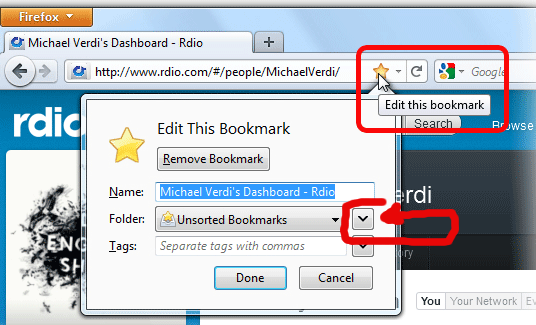
Click the "down arrowhead" to access the entire list of folders. If you don't have button there, try switching back to the default theme.
Ler a resposta no contexto 👍 0All Replies (5)
To bookmark a page, click the star symbol at the end of the location bar twice.
Sorry, Xircal - I got the same result for Edit Bookmark (dble clik on star) as before , i.e., where the box says Folder: with 'Bookmarks Menu' in the space, I can clik on the little down arrow or clik on the little icon; either way, I can only get 5 of my Bookmark folders to appear. I should be able to get the full list of my bookmark folders so I can put the webpage straight into the right one. I CAN bookmark a page, but only to Bookmarks Menu/ 'Recently Bookmarked'. Then I have to drag it into the correct folder. In other words, the 'Choose....' option isn't working properly. Any other suggestions? Thanks dallard
Chosen Solution
Click the "down arrowhead" to access the entire list of folders. If you don't have button there, try switching back to the default theme.
Start Firefox in Use Troubleshoot Mode in Firefox to check if one of the extensions is causing the problem (switch to the DEFAULT theme: Firefox (Tools) > Add-ons > Appearance/Themes).
- Don't make any changes on the Safe mode start window.
- https://support.mozilla.com/kb/Safe+Mode
If it does work in Safe-mode then disable all extensions and then try to find which is causing it by enabling one at a time until the problem reappears.
- Use "Disable all add-ons" on the Safe mode start window to disable all extensions.
- Close and restart Firefox after each change via "File > Exit" (Mac: "Firefox > Quit"; Linux: "File > Quit")
This can be caused by a problem with the file places.sqlite that stores the bookmarks and the history.
Thanks to all who replied. Problem solved. I dble clicked the location bar star and followed the-edmeister's diagram because it was the only thing I could understand (I'm not really one of you), put 'Unsorted Bookmarks' into the folder space, and clicked on the large down arrow. The full list of my folders appeared. The second time I tried it, I tried rt clicking on (this) page instead of on the star in the location bar and clicked 'Bookmark this page'. The Edit Bookmarks box appeared again with 'Unsorted Bookmarks' already in the Folder space and clicking the large down arrow produced the full list of folders. The 'Choose'option no longer appears which is odd, but it works, so thanks again. dallard