


Windows 10 reached EOS (end of support) on October 14, 2025. If you are on Windows 10, see this article.

Search Support

Avoid support scams. We will never ask you to call or text a phone number or share personal information. Please report suspicious activity using the “Report Abuse” option.

Learn More
Open

All of my tab groups dissappear after a recent (unwanted) update to 157.0.1 version

m.rizka1234

I'm the kinda person who avoid getting updates cause don't fix it when it ain't broke, but they fix it now it's broke.

My Firefox automatically updating itself to version 157.0.1, which is a normal thing, but the unnormal one was that my tab groups are gone entirely. Like there are none left, which is weird knowing unwanted updates happened in the past with no meaningful changes to me, but this one did, albeit more displeasing.

Is there a way to restore all of my tab groups back? Thanks
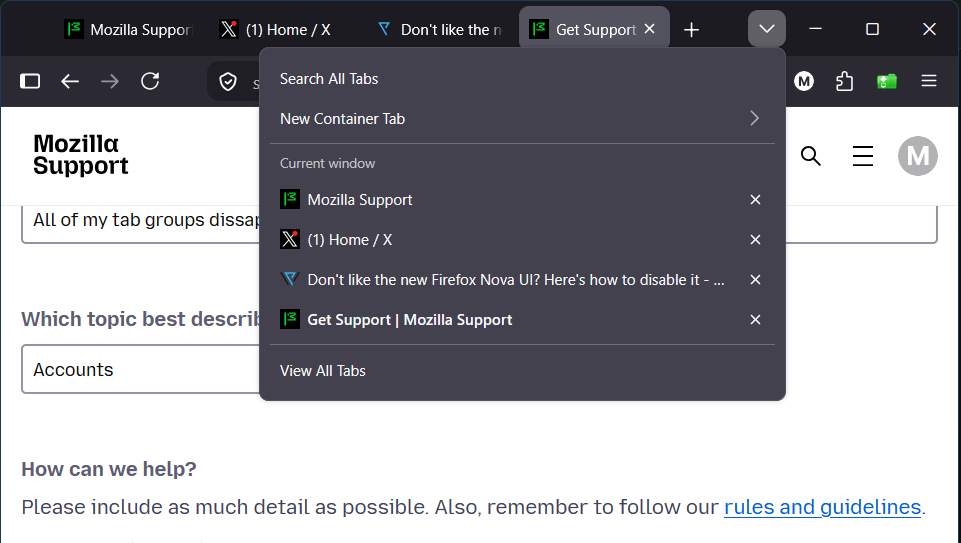
I'm the kinda person who avoid getting updates cause don't fix it when it ain't broke, but they fix it now it's broke. My Firefox automatically updating itself to version 157.0.1, which is a normal thing, but the unnormal one was that my tab groups are gone entirely. Like there are none left, which is weird knowing unwanted updates happened in the past with no meaningful changes to me, but this one did, albeit more displeasing. Is there a way to restore all of my tab groups back? Thanks
Capturas de pantalla anexas

All Replies (1)

Have you tried to restore the previous session? https://support.mozilla.org/en-US/kb/restore-previous-session

If this is not working, maybe you can try Firefox troubleshoot mode. https://support.mozilla.org/en-US/kb/diagnose-firefox-issues-using-troubleshoot-mode

Ask a question

You must log in to your account to reply to posts. Please start a new question, if you do not have an account yet.