


Urgently need help transferring Thunderbird...

Hello fellow Thunderbirds,
I have been using Thunderbird for years and had thousands of emails in quite a few folders, with a shit-tonne of filters etc. My emails were running pretty well. I only use two addresses, but the folders help manage everything.
I just got a new computer last week. Prior to switching over to the new computer I read through the 'Export your Thunderbird Profile' help page, and the 'Move Thunderbird data to a new computer' pages. I've tried to follow all the info there (with a glitch, explained below).
I am using a Windows system and have gone from Win10 to Win11.
I have the following data:
- Mozilla Maintenance Service (in Program Files (x86) ).
- Mozilla Thunderbird (in Program Files (x86) )
- Thunderbird (In Users/Username/AppData/Local/Thunderbird) (Contains 'profile' and 'updates'
I tried to swap the above data into the same spots on the new computer, but alas, it's not working. I *may*, however, have fucked it up myself...
So... When I got the new computer, I immediately downloaded Firefox, but, alas, I entered my email's details before closing it down. It did download a few off the server, but only a day's worth (before I realised I screwed up).
As soon as I realised I'd mucked up, I uninstalled Thunderbird and deleted the files on the new computer (you know how when you download it doesn't always remove all the stuff, so I tried to do this).
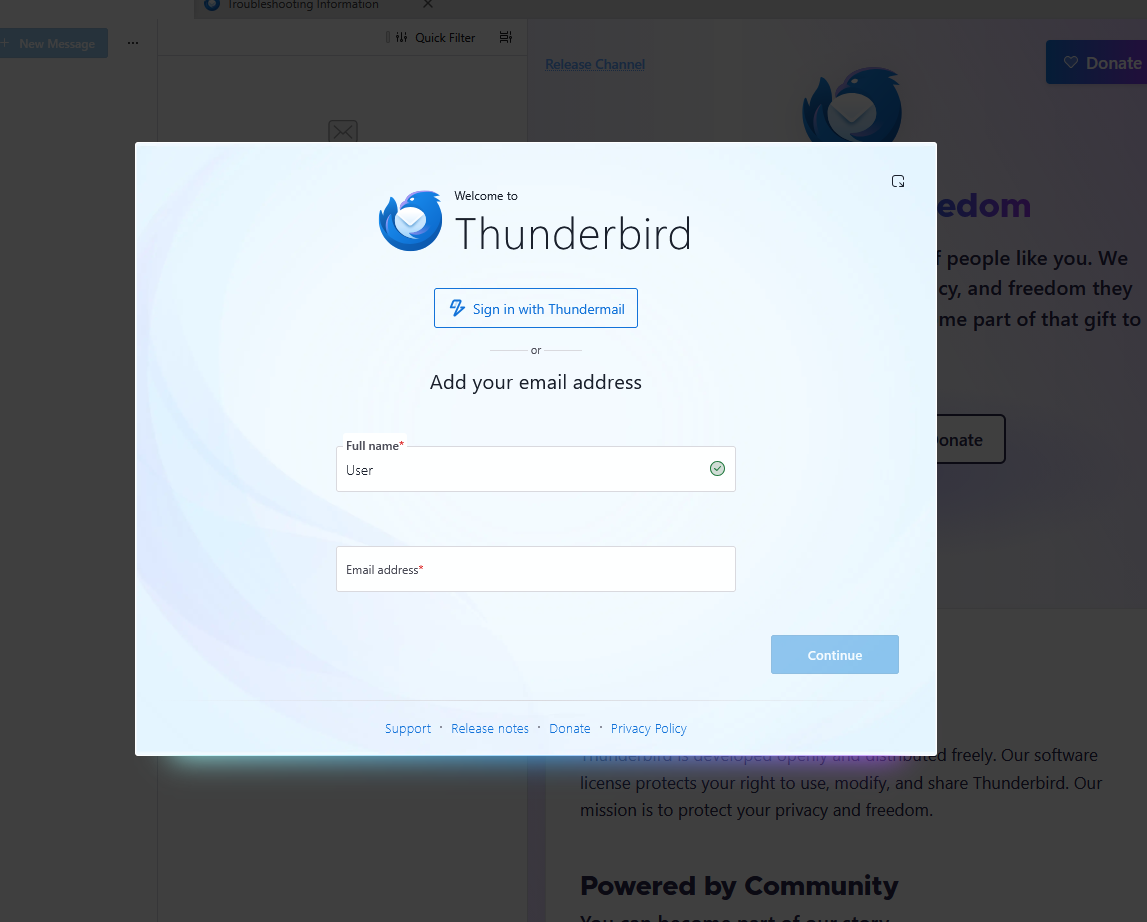
I reinstalled Thunderbird, but closed it prior to loading the email addresses on (as instructed). I then transferred all the above data into the corresponding file areas on the new computer. However, everytime I try to run the program it just goes to the standard open screen (with the popup that prompts you to enter your email addresses and details into it - see image, below, in case I'm not explaining it right).
Anyway, I'd appreciate any help you might be able to give me as I'm desperate to get my emails running again and have access to all the saved emails which were in my system. Kindly. Larysa.
All Replies (9)
Hello,
"Thunderbird (In Users/Username/AppData/Local/Thunderbird) (Contains 'profile' and 'updates' "
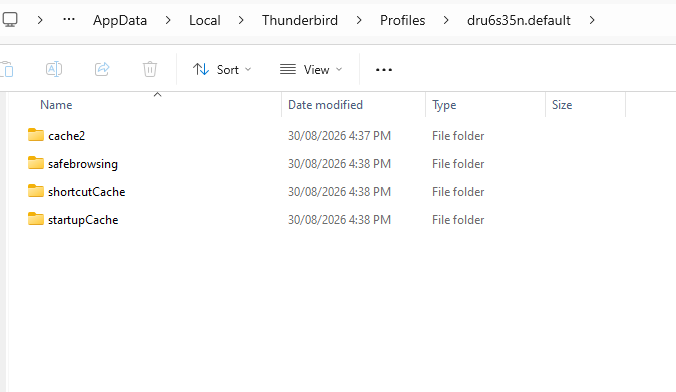
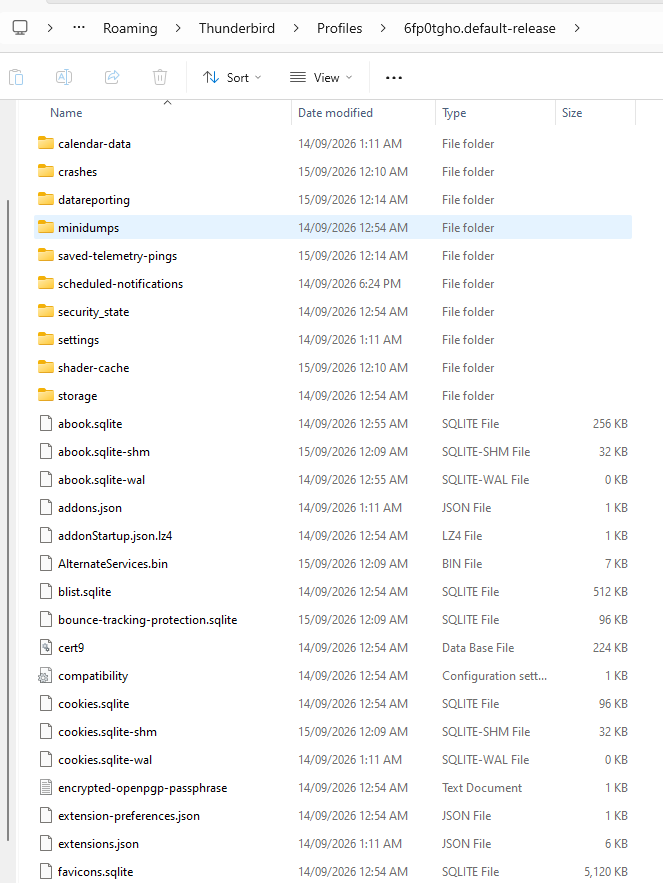
The Thunderbird folder in "Local" contains only the cache data. By default Thunderbird stores your account and message data in .... Users/Username/AppData/Roaming/Thunderbird/
Thanks Mapenzi, I really appreciate your reply.
I note that I did have the incorrect folder, but, I went to my saved copy of the C-Drive, I don't seem to have that file. I follow the stream down from C-Drive Info (my main saved file)/users/Larysa/AppData, then in AppData, the only things there are a 'Local' and a 'LocalNow' folder.
The 'Local' folder seems to contain all the programmes and apps I had on the old computer, and does contain a 'Thunderbird' folder, but all this has in it are 'Profiles' and 'Updates' folders. This folder contains only a few sub-folders- please see the Screenshot Thunderbird - OLD profiles folder contents' image.' image.
On the new upload, if I follow the folders as directed in your message, (users/user/AppData/Roaming/Thunderbird), then go into the 'Profiles/random.default-release' folder, it contains a whole huge lot of sub-folders (see attached 'Screenshot Thunderbird - NEW profiles folder contents' image).
So, I cannot work out what to do... Sorry if I seem so daft...
Oh, Also, prior to swapping over computers, I also exported a zipped file of my Thunderbird Profile, as 'Thunderbird_profile_backup', and it downloaded as a zipped file, but I cannot work out how to unzip it! Additionally, I tried to import this zipped file into Thunderbird using the import function, and, although I did exactly as commanded by the system, it just tells me that I can only import a file under 2Gb, whereas my zipped file is almost 74Gb... So, I don't know whether this will even work, and if it does, what good is it? Could this help? Also, I just tried to unzip the folder again, and it says 'corrupted'... So not even sure this will work...
Do you think I might need to turn my old computer back on and see whether I can find this data? I might try that tomorrow and see whether I can find the AppData/Local/Thunderbird folder with all the expected data in it? I'm hoping it still works. I had to cannibalise almost all of the HDDs in it, but the SSD which the programmes were running off is still there, as are all the 'computer guts', so I *think* it should still work.
Anyway, if you have any other ideas, I'd be grateful... Larysa.
Go back to your old compute, go to C:\Users/Username/AppData/Roaming/Thunderbird/ copy/paste the entire folder Thunderbird on an USB flash drive with big memory. Connect the flash drive to your new computer. Verify that Thunderbird is not running, navigate to C:\Users/Username/AppData/Roaming/ and remove the actual Thunderbird folder. Drag the "Thunderbird " folder from your flash drive in the Roaming folder of the new PC and start Thunderbird https://support.mozilla.org/en-US/kb/moving-thunderbird-data-to-a-new-computer
OK, so, I'm going to have to get the old computer running again. I just tried, and it had a black screen telling me it couldn't boot (and to 'instal boot drive'). It's frustrating, because the only thing I did on the old computer was take 5 HDDs out of it, but, my belief is that the 'boot drive' is the SSD, which is still in there. So, I'm considering buying an SSD enclosure and basically turn the SSD into a big thumb drive. I should be able to get the file off that, shouldn't I????? I could use that, plug it into the new computer and just transfer the file directly from there to the new Thunderbird location. Will that work? Thanks, Larysa.
Hi Larysa,
Larysa said
Thanks Mapenzi, I really appreciate your reply. ........ Oh, Also, prior to swapping over computers, I also exported a zipped file of my Thunderbird Profile, as 'Thunderbird_profile_backup', and it downloaded as a zipped file, but I cannot work out how to unzip it! Also, I just tried to unzip the folder again, and it says 'corrupted'...
Maybe the zipped file is too big to be handled by the unzip tool you are using. Have you also tried with another extractor?
Larysa said
So, I'm considering buying an SSD enclosure and basically turn the SSD into a big thumb drive. I should be able to get the file off that, shouldn't I????? I could use that, plug it into the new computer and just transfer the file directly from there to the new Thunderbird location.
I am no computer technician but this seems a good idea. If the SSD containing your old date is still in good shape, it should be possible to connect it to the new computer, transfer the \AppData\Roaming\Thunderbird\ folder on the new PC and paste in the same location in ..\AppData\Roaming\ here
Have you also tried with another extractor?
Yes, a couple. I think it's corrupted... :'(
Thanks for your approval of my SSD idea, it makes me more comfortable in it. Drive case should be here tomorrow. I'll report back :)
Oh. My. F'ing. Daylights....
So... The drive case turned up. Removed the SSD out of the old computer and installed it in the case. Plugged it in. It has all the normal-looking files on it. BUT... The 'users' section has two folders: Default, and <my_daughter's_name> (Dtr). So, I went through the Dtr file, into the roaming, then Thunderbird. Took that Thunderbird folder and installed it into the requisite site. Then I started up Thunderbird, and, whoa and behold - IT STARTED UP THUNDERBIRD AS MY DAUGHTER!!! And, not only that, but, she hasn't used Thunderbird for YEARS, so it's some really old email addys.
BUT - the really shit thing is - I cannot find my OWN Thunderbird anywhere on that SSD.
What else could go wrong? And, possibly more importantly - WHERE IS MY THUNDERBIRD FILE!!??!!??!!
Out of desperation, I looked in the 'Default' folder, which has an AppData>Roaming, but only has macromedia and microsoft files in it (none of which contain Thunderbird. I checked in desperation).
I honestly don't know how this happened. The only thing I can think is that my Daughter's ex built the computer I'm just superceding. I can only guess that he re-used an old SSD he had and put that into my computer.
But this still leaves me with - WHERE IS MY FILE?!?!
I don't think there are actually any other HDDs in my old computer, but my son's going to check for me in a little while. Maybe if there's another one there the data is in that??? Man. How annoying is all this... Kindly, Larysa.
This is really a very uncomfortable situation for you and beyond my usual skills. You had 5 HDDs in your old computer, the SSD doesn't contain your own Windows account but your daughter's with her Thunderbird profile. What if your own data were on one of the other HDDs ? I hope that your son will have success in identifying a hard disk containing your date; otherwise you would help by a computer specialist. One more hint: If your son finds your old date you must not look for a Thunderbird "file" but a "folder"
Hi Mapenzi... You're right, sorry, I misspoke, I meant 'folder'.. :)
So, there was one other HDD in the old computer that we'd installed in the new one, but it wasn't plugged in because there aren't enough cable slots for it. (I'd need to get another power cable, and SATA cable). I'd meant to get cables and sort it out after I mucked around with all the setup BS.
I got my son to swap the cables off one of the current drives to this one so I could check it, but it wouldn't boot up. I had him swap the cables back, and remove the errant drive. I wondered whether putting it into an external case might make it work so I can check it. I've ordered the case and it should be here later today. I'll test it when the case turns up.
So far I have checked all the drives currently in the computer, and done a search for 'Thunderbird' in each drive, to no avail. I've found three 'Thunderbird' folders. One's basically empty, one's my daughter's, and one's my son's off a VERY old backup of one of his laptops I had (which I discounted immediately).
So, I can see I have a MASSIVE project ahead of me. I need to go through EACH drive and delete a lot of very old shit! lol Thankfully, I got a new 8Tb drive with the new computer, so I think I'll use that as a receptacle for all the data I want to keep, then delete everything. This should give me a cumulative 13Tb of drives, which means I won't have to buy new drives for YEARS. :)
Still, This is all quite vexing. I have a tonne of really important emails on there.
Anyway, hopefully I'll find something on there once I plug the drive in. I'll let you know how I go, just for closure. Again, thanks heaps for all your help and feedback. Larysa.