


Why won't Thunderbird download incoming emails?

I keep getting the following error when trying to download emails from yahoo.mail: Authentication failure while connecting to server pop.mail.yahoo.com Have hundreds of emails sitting in yahoo.mail that I need to load onto my desktop. Any help is appreciated!
All Replies (2)

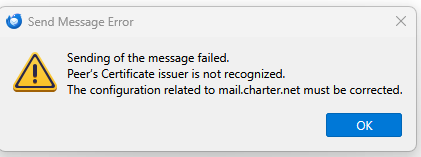
I am having a similar issue but my mail server is Spectrum (charter.net). When I try to download mail it fails and when i try to send an email it also fails. I went to troubleshooting mode in Thunderbird and the errors still occur. I get some more information on the failure type. It seems to be not being able to get to the mail.charter.net server. From getting messages it says there is a non trusted certificate. For outgoing there is an issue with the "peer". I have added screen shots of those messages as well as the mail configuration from the troubleshooting feature.
I am using the latest (at the time of this writing) version of Thunberbird (151.0.1) on a Windows 11 PC which has all the current patches and downloads.
I called Spectrum and they "don't support Thunderbird" directly. I have been using Thunderbird for over 5 years with this exact same account. I use PoP and do not want to use IMAP, and verified with Spectrum that the server name and ports were correct: mail.charter.net:port 995 for incoming and mail.charter.net:port 465 for SMTP outgoing. Both are set to SSL/TLS.
I can log in to Spectrum's web mail and read and send mails fine, but I really want to use Thunderbird. It was odd, because I was able to download and send email as of yesterday, but my last downloaded mail was from 12:47 pm and nothing since then. There are new messages in Spectrum's web mail I have not downloaded so would like that to get working again.



Hi, Defreel,
No need to change your settings or switch to IMAP. Your ports and POP setup are 100% correct.
Spectrum is actually having a widespread security certificate issue on their backend mail servers right now. That is why you started getting those "non-trusted certificate" and "peer" errors yesterday afternoon. Thunderbird is just blocking the connection to keep your data secure.
Since it's an issue on their side, please don't delete your account or change passwords. Just use webmail as a temporary workaround for now. Once Spectrum fixes their server certs, Thunderbird will automatically sync and download all your missing emails.