


Outgoing messages refuse to send with thunderbird

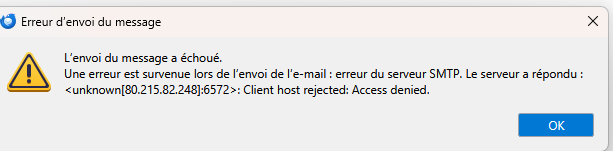
Hello, I only use Thunderbird on my PC with IMAP. For the past three days, while I receive my emails just fine, I can no longer send them. They bounce back with the following error message:
The only thing I've done is also install Thunderbird on my mobile phone. It asked me for a password that I don't know and don't think I've ever had one for Thunderbird.
However, when I go directly to the Free Zimbra website associated with my email, it works and I can send my emails. Thank you for your help.
Christian - Error message attached.
Chosen solution
Good evening David, I had another problem today because my Free email account was inactive and forced me to change my password. So, I deleted all the data from my Free email account, and once my email was restored, I re-entered my login details on Thunderbird. The same scenario as before occurred: my outgoing emails worked directly on Zimbra but wouldn't send via Thunderbird. Receiving emails through Thunderbird worked fine. However, the error message was simpler: "The message could not be sent because the connection to the outgoing server (SMTP) 'smtp.free.fr' has timed out. Please try again."
Finally, after searching for a solution, I managed to resolve the problem by modifying the outgoing server settings and changing the port to 465. Thank you, David, for your advice.
Ler a resposta no contexto 👍 0All Replies (5)
Please translate the errror message fully into English to receive suggestions. thank you
Hello David and Thanks for answer, I only use Thunderbird on my PC with IMAP. For the past three days, while I receive my emails just fine, I can no longer send them. They bounce back with the following error message:
The only thing I've done is also install Thunderbird on my mobile phone. It asked me for a password that I don't know and don't think I've ever had one for Thunderbird.
However, when I go directly to the Free Zimbra website associated with my email, it works and I can send my emails. Thank you for your help.
Christian - Error message attached. Attached screenshots said: The attached photo, translated into English, says: An error occurred while sending the email: SMTP server error. The server responded: ....(see photo)
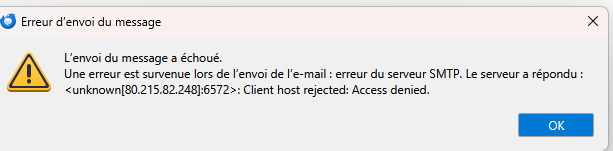
It appears you are belng blocked, possibly due to an error in the SMTP configuration. Posting a screenshot of the SMTP server settings pane may generate some suggestions. re you able to send email to anyone, or no one?
Chosen Solution
Good evening David, I had another problem today because my Free email account was inactive and forced me to change my password. So, I deleted all the data from my Free email account, and once my email was restored, I re-entered my login details on Thunderbird. The same scenario as before occurred: my outgoing emails worked directly on Zimbra but wouldn't send via Thunderbird. Receiving emails through Thunderbird worked fine. However, the error message was simpler: "The message could not be sent because the connection to the outgoing server (SMTP) 'smtp.free.fr' has timed out. Please try again."
Finally, after searching for a solution, I managed to resolve the problem by modifying the outgoing server settings and changing the port to 465. Thank you, David, for your advice.