inbox mail are all marked as drafts

Hi. All the inbox messages are marked "drafts".Have compared ALL settings with TB on my other computer and nrheyare the same.Both have version 138.0.1.This is very annoying and dont know when or how it started.Thanks for your help.

All Replies (3)
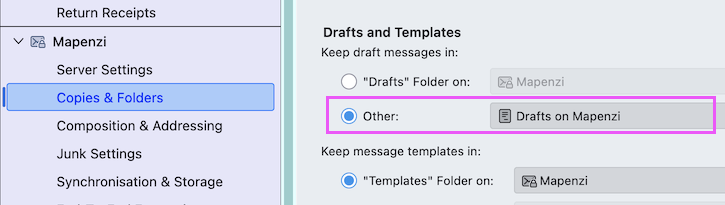
in Account Settings > Copies & folders which is the destination folder for Drafts? In earlier TB versions one could use the add-on "FolderFlags" https://addons.thunderbird.net/en-us/thunderbird/addon/folderflags/ to correct such an anomaly but it is not yet compatible with TB 138.
Hi.I should not have to install an add-on.Other computer has none and settings are all the same.Why is this doing this????
I know that it should NOT happen, nevertheless it happens and I don't know WHY. Try the following (no guarantee!): return to your Account Settings > "faulty" account > Copies & Folders > Drafts & Templates, check ◉ Other and select "Drafts on myaccoutname" (see picture)