


Windows 10 reached EOS (end of support) on October 14, 2025. If you are on Windows 10, see this article.

Sykje yn Support

Mij stipescams. Wy sille jo nea freegje in telefoannûmer te beljen, der in sms nei ta te stjoeren of persoanlike gegevens te dielen. Meld fertochte aktiviteit mei de opsje ‘Misbrûk melde’.

Mear ynfo
Dizze konversaasje is argivearre. Stel in nije fraach as jo help nedich hawwe.
Argivearre

MFA Setup with DUO Fails Secure Code Check

cor-el beäntwurde
Flash

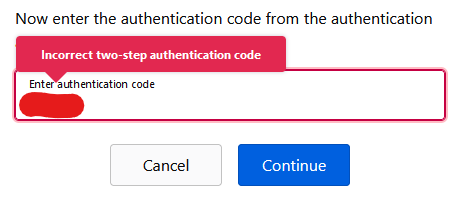
I'm trying to setup MFA with DUO Mobile app, and I get past the part where I scan the QR code successfully. However, when it requests that I then enter the code generated by the app it rejects the code each and every time. My DUO app (on iPhone) is updated to the most current version as of today (6/30/2024), and my iPhone is updated to most current iOS version for iPhone 13, as of today. However, after multiple attempts the issue persists.
I'm trying to setup MFA with DUO Mobile app, and I get past the part where I scan the QR code successfully. However, when it requests that I then enter the code generated by the app it rejects the code each and every time. My DUO app (on iPhone) is updated to the most current version as of today (6/30/2024), and my iPhone is updated to most current iOS version for iPhone 13, as of today. However, after multiple attempts the issue persists.
Keppele skermôfbyldingen

Alle antwurden (1)

Two-Factor authentication (2FA) works with a 6-digit time-based code (TOTP:Time-based One-Time Password) that is valid only for thirty seconds, so make sure that time and timezone are correct on all devices especially on the mobile device with the Authenticator App that generates the TOTP code. More info: