


can't load/view ebay description/Shipping and payments tabs

Suddenly this morning the "description"/"Shipping and payments" Tabs on all of ebay listings disappear! I try clearing cache/cookies, disable pop up blocking e.t.c. but the problem consists. Everything works ok, except that any ebay listing i'm trying to see doesn't seem to load the "description"/"Shipping and payments" Tabs. I'm using windows 7 64bit with firefox 31.0

Keazen oplossing
A cookie, basically, is used by web sites to store options and information for that site. It could be one of the site options is bad.
Go to the Mozilla Add-ons Web Page {web link} (There’s a lot of good stuff here) and search for what you want.
What you want is a cookie controller, something that removes that one (not all) cookie for you. I do not use them, but I found this list;
https://addons.mozilla.org/en-US/firefox/search/?q=cookie
====
This is a list of help files about cookies. https://support.mozilla.org/en-US/search?esab=a&w=1&q=cookie
Alle antwurden (5)
Many site issues can be caused by corrupt cookies or cache.
- Clear the Cache
Firefox/Tools > Options > Advanced > Network > Cached Web Content: "Clear Now"
and
- Remove Cookies
Warning ! ! This will log you out of all sites you're logged in to. Press the Alt or F10 key to bring up the tool bar. Followed by;
Windows; Tools > Options Linux; Edit > Preferences Mac; application name > Preferences
Then Privacy. Under History, select Firefox will Use Custom Settings. There is a button on the right side called Show Cookies.
If there is still a problem, Start Firefox in Safe Mode {web link} While you are in safe mode; Press the Alt or F10 key to bring up the tool bar. Followed by;
Windows; Tools > Options Linux; Edit > Preferences Mac; application name > Preferences
Then Advanced > General. Look for and turn off Use Hardware Acceleration.
Poke around safe web sites. Are there any problems?
Then restart.
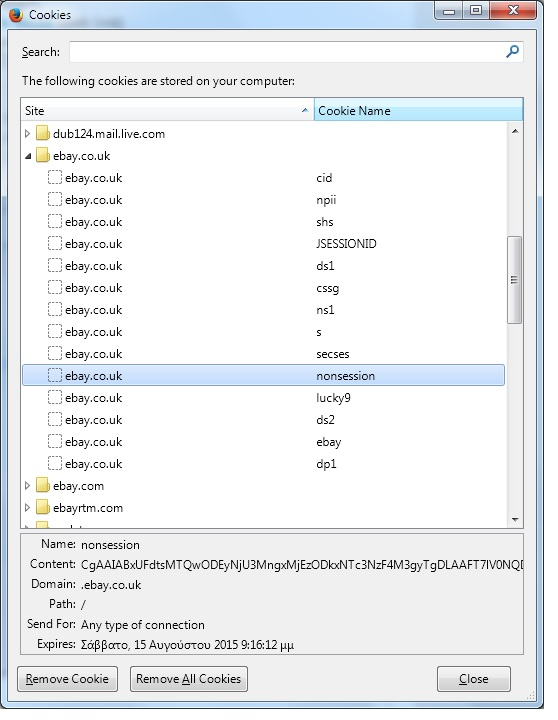
Thanks FredMcD for your answer. Now,i think i found the culprit! It's a specific cookie (named "nonsession") under ebay.co.uk (see attached image). Btw, i have no problem if i connect through ebay.com! Problem appears only under ebay.co.uk Whenever i remove this specific cookie, listings appear just fine! But the problem is that if i close firefoc and restart it,the problem re appears and i need to remove cookie again! I suppose there is a much more practical solution of removing the dammed cookie each time by hand! :-)
Bewurke troch ikonsgr op
Keazen oplossing
A cookie, basically, is used by web sites to store options and information for that site. It could be one of the site options is bad.
Go to the Mozilla Add-ons Web Page {web link} (There’s a lot of good stuff here) and search for what you want.
What you want is a cookie controller, something that removes that one (not all) cookie for you. I do not use them, but I found this list;
https://addons.mozilla.org/en-US/firefox/search/?q=cookie
====
This is a list of help files about cookies. https://support.mozilla.org/en-US/search?esab=a&w=1&q=cookie
Thanks again FredMcD! I just install cookie controller and now everything is ok!
That's good to hear. Happy computing.