


Thunderbird - A blank at the beginning of a paragraph and sometimes blanks in the middle show as ??

When someone receives an email from me, some blanks are translated into ?? (not all) I do not see them on the sent mail, but if the receiver replies I see them in the original text. This has started only in the last week. I am on Windows 10 - not sure of Thunderbird level.
Solution choisie
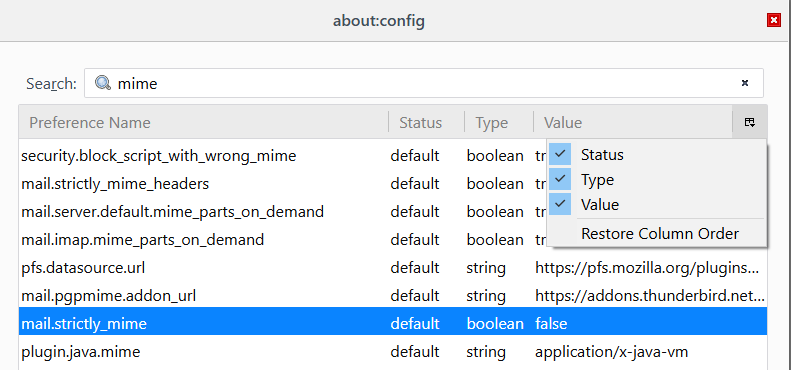
Double-click the preference to change it to true, or right-click, Toggle. If you don't see the value column, perhaps you have it hidden (see picture).
Toutes les réponses (4)
Hello vickyfecteau,
Would you try this please :
Go to the Configuration Editor (Tools, Options, Advanced, General, Config Editor). Scroll down to mail.strictly_mime Click on it and change it from "false" to true.
'Hope that does the trick ......
Thanks. I tried that after reading a previous post - when doing the above, it shows for mail.strictly_mime a status of default and type boolean seems to be no way to change "false"
Solution choisie
Double-click the preference to change it to true, or right-click, Toggle. If you don't see the value column, perhaps you have it hidden (see picture).
Seems to have worked - thank you McCoy and sfhowes!