


'Local folders' no longer appears in the side bar (Mac).

After I migrated everything to a different computer, 'Local folders' no longer appears in the side bar, so I cannot archive messages locally.
Can some kind person please help me to reinstate it?
After I migrated everything to a different computer, 'Local folders' no longer appears in the side bar, so I cannot archive messages locally.
Can some kind person please help me to reinstate it?
Chosen solution
May be you accidentally clicked on the "Folder pane options" ●●● button and chose "Hide Local Folders"?
Read this answer in context 👍 1All Replies (3)
Chosen Solution
May be you accidentally clicked on the "Folder pane options" ●●● button and chose "Hide Local Folders"?
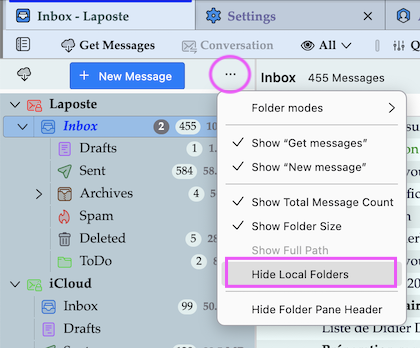
Thank you so much, Mapenzi. Perfect. I'd been trying for so long to solve this! And all this time those three little dots (which I hadn't even noticed) held the answer!
Thunderbird developers have tendency to put certain drop-down menus behind ominous dots and lines ....
Modified by Mapenzi