


Firefox crashes

Application Basics
------------------

Name: Firefox
Version: 25.0.1
User Agent: Mozilla/5.0 (Windows NT 6.1; WOW64; rv:25.0) Gecko/20100101 Firefox/25.0

Extensions
----------

Name: DownloadHelper
Version: 4.9.21
Enabled: false
ID: {b9db16a4-6edc-47ec-a1f4-b86292ed211d}

Name: Troubleshooter
Version: 1.1a
Enabled: false
ID: troubleshooter@mozilla.org

Name: VideoDownloadConverter
Version: 5.54.2.51006
Enabled: false
ID: 4zffxtbr@VideoDownloadConverter_4z.com

Important Modified Preferences
------------------------------

accessibility.typeaheadfind.flashBar: 0
browser.cache.disk.capacity: 358400
browser.cache.disk.smart_size.first_run: false
browser.cache.disk.smart_size.use_old_max: false
browser.cache.disk.smart_size_cached_value: 358400
browser.places.smartBookmarksVersion: 4
browser.sessionstore.upgradeBackup.latestBuildID: 20131112160018
browser.startup.homepage_override.buildID: 20131112160018
browser.startup.homepage_override.mstone: 25.0.1
dom.mozApps.used: true
extensions.lastAppVersion: 25.0.1
network.cookie.prefsMigrated: true
places.database.lastMaintenance: 1385954272
places.history.expiration.transient_current_max_pages: 104858
plugin.disable_full_page_plugin_for_types: application/pdf
plugin.importedState: true
plugin.state.flash: 1
plugin.state.nppdf: 1
plugin.state.npqtplugin: 1
plugin.state.npvlc: 1
print.printer_hp_deskjet_845c.print_bgcolor: false
print.printer_hp_deskjet_845c.print_bgimages: false
print.printer_hp_deskjet_845c.print_colorspace:
print.printer_hp_deskjet_845c.print_command:
print.printer_hp_deskjet_845c.print_downloadfonts: false
print.printer_hp_deskjet_845c.print_duplex: 0
print.printer_hp_deskjet_845c.print_edge_bottom: 0
print.printer_hp_deskjet_845c.print_edge_left: 0
print.printer_hp_deskjet_845c.print_edge_right: 0
print.printer_hp_deskjet_845c.print_edge_top: 0
print.printer_hp_deskjet_845c.print_evenpages: true
print.printer_hp_deskjet_845c.print_footercenter:
print.printer_hp_deskjet_845c.print_footerleft: &PT
print.printer_hp_deskjet_845c.print_footerright: &D
print.printer_hp_deskjet_845c.print_headercenter:
print.printer_hp_deskjet_845c.print_headerleft: &T
print.printer_hp_deskjet_845c.print_headerright: &U
print.printer_hp_deskjet_845c.print_in_color: true
print.printer_hp_deskjet_845c.print_margin_bottom: 0.5
print.printer_hp_deskjet_845c.print_margin_left: 0.5
print.printer_hp_deskjet_845c.print_margin_right: 0.5
print.printer_hp_deskjet_845c.print_margin_top: 0.5
print.printer_hp_deskjet_845c.print_oddpages: true
print.printer_hp_deskjet_845c.print_orientation: 0
print.printer_hp_deskjet_845c.print_page_delay: 50
print.printer_hp_deskjet_845c.print_paper_data: 1
print.printer_hp_deskjet_845c.print_paper_height: 11.00
print.printer_hp_deskjet_845c.print_paper_name:
print.printer_hp_deskjet_845c.print_paper_size_type: 0
print.printer_hp_deskjet_845c.print_paper_size_unit: 0
print.printer_hp_deskjet_845c.print_paper_width: 8.50
print.printer_hp_deskjet_845c.print_plex_name:
print.printer_hp_deskjet_845c.print_resolution: 0
print.printer_hp_deskjet_845c.print_resolution_name:
print.printer_hp_deskjet_845c.print_reversed: false
print.printer_hp_deskjet_845c.print_scaling: 1.00
print.printer_hp_deskjet_845c.print_shrink_to_fit: true
print.printer_hp_deskjet_845c.print_to_file: false
print.printer_hp_deskjet_845c.print_unwriteable_margin_bottom: 0
print.printer_hp_deskjet_845c.print_unwriteable_margin_left: 0
print.printer_hp_deskjet_845c.print_unwriteable_margin_right: 0
print.printer_hp_deskjet_845c.print_unwriteable_margin_top: 0
privacy.sanitize.migrateFx3Prefs: true
storage.vacuum.last.index: 1
storage.vacuum.last.places.sqlite: 1385756999

Graphics
--------

Adapter Description: Mobile Intel(R) 965 Express Chipset Family
Adapter Drivers: igdumd64 igd10umd64 igdumdx32 igd10umd32
Adapter RAM: Unknown
Device ID: 0x2a02
Direct2D Enabled: Blocked for your graphics driver version.
DirectWrite Enabled: false (6.2.9200.16492)
Driver Date: 9-23-2009
Driver Version: 8.15.10.1930
GPU #2 Active: false
GPU Accelerated Windows: 0/2 Basic
Vendor ID: 0x8086
WebGL Renderer: Google Inc. -- ANGLE (Mobile Intel(R) 965 Express Chipset Family Direct3D9Ex vs_3_0 ps_3_0)
windowLayerManagerRemote: false
AzureCanvasBackend: skia
AzureContentBackend: none
AzureFallbackCanvasBackend: cairo
AzureSkiaAccelerated: 0

JavaScript
----------

Incremental GC: true

Accessibility
-------------

Activated: false
Prevent Accessibility: 0

Library Versions
----------------

NSPR
Expected minimum version: 4.10.2
Version in use: 4.10.2

NSS
Expected minimum version: 3.15.3 Basic ECC
Version in use: 3.15.3 Basic ECC

NSSSMIME
Expected minimum version: 3.15.3 Basic ECC
Version in use: 3.15.3 Basic ECC

NSSSSL
Expected minimum version: 3.15.3 Basic ECC
Version in use: 3.15.3 Basic ECC

NSSUTIL
Expected minimum version: 3.15.3
Version in use: 3.15.3Modified by cor-el
All Replies (6)
When Firefox crashes, it usually records information about what was happening at that moment. You can submit that data to Mozilla and share it with forum volunteers to see whether it points to the solution.
Please check the support article "Firefox Crashes" (especially the last section) for steps to get those crash IDs, and then post some of the recent ones here.
If that's not possible, have you tried Firefox's Safe Mode? That's a standard diagnostic tool to bypass interference by extensions (and some custom settings). More info: Use Troubleshoot Mode in Firefox.
You can restart Firefox in Safe Mode using
Help > Restart with Add-ons Disabled
In the dialog, click "Start in Safe Mode" (not Reset)
If Firefox works better (is more stable) in Safe Mode, we could suggest various next steps based on that information. If it's just as bad, that would be good to know as well.
Try Firefox Safe Mode to see if the problem goes away. Safe Mode is a troubleshooting mode, which disables most add-ons.
(If you're not using it, switch to the Default theme.)
- On Windows you can open Firefox 4.0+ in Safe Mode by holding the Shift key when you open the Firefox desktop or Start menu shortcut.
- On Mac you can open Firefox 4.0+ in Safe Mode by holding the option key while starting Firefox.
- On Linux you can open Firefox 4.0+ in Safe Mode by quitting Firefox and then going to your Terminal and running: firefox -safe-mode (you may need to specify the Firefox installation path e.g. /usr/lib/firefox)
- Or open the Help menu and click on the Restart with Add-ons Disabled... menu item while Firefox is running.
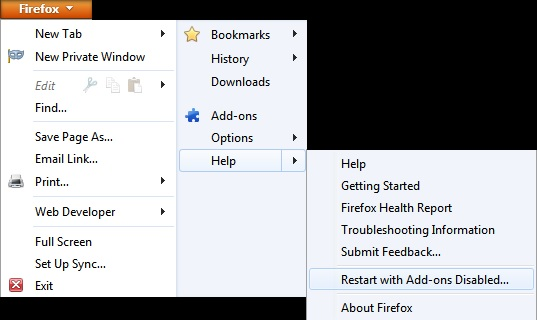
Once you get the pop-up, just select "'Start in Safe Mode"
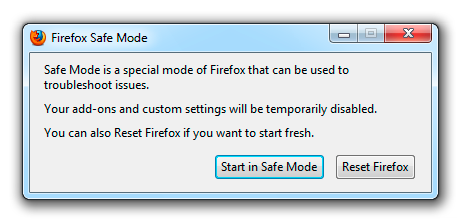
If the issue is not present in Firefox Safe Mode, your problem is probably caused by an extension, and you need to figure out which one. Please follow the Troubleshoot extensions, themes and hardware acceleration issues to solve common Firefox problems article for that.
To exit the Firefox Safe Mode, just close Firefox and wait a few seconds before opening Firefox for normal use again.
When you figure out what's causing your issues, please let us know. It might help other users who have the same problem.
Please report back soon.
If you have submitted crash reports then please post the IDs of one or more recent crash reports that have a "bp-" prefix:
- bp-xxxxxxxx-xxxx-xxxx-xxxx-xxxxxxxxxxxx
You can find the IDs of the submitted crash reports on the about:crashes page.
- You can open the about:crashes page via the location bar, like you open a website, or open the crash reports page via "Help > Troubleshooting Information".
See:
here are some crash IDs from other threads the user has opened:
- Crash ID: bp-d3fa911c-5be6-4531-8fa1-aef052131207
- Crash ID: bp-be83dbf8-9669-4b89-bcc5-5c9512131207
- Crash ID: bp-a412b464-3b93-4235-8806-b00042131207
- Crash ID: bp-6d7892fe-5e9e-4a8c-bab2-abbbb2131207
- Crash ID: bp-2b93cda6-3ba8-4e64-b490-406242131207
- Crash ID: bp-4d882724-a240-461e-b06a-e4fcc2131207
- Crash ID: bp-5ae94df5-c267-41ca-8e18-a088c2131202
Hi everyone.
Firefox continues to crash regularly. Using Safe Fox appears to have no effect on the crashing.
Firebuggy
The crashes are related to JavaScript garbage collection (usually freeing or accessing memory that is still in use) and such crashes can be hard to track down.
Did you try the basic troubleshooting steps?