


Missing all local folders created and missing emails prior to May 1

This morning I noticed that all emails prior to May 1 were missing from folders that I created. I assumed (incorrectly) that they were in the sbd file that I backed up in April. So I moved that file into the proper destination location but nothing popped up. I then restored the old sbd file back and now I don't even see any the the folders that I created. Note: when I click on the sbd file I do see the folders but they don't appear under Local Folders I've googled and used AI....no luck
Chosen solution
Thanks for your feedback! I'm glad I could help you.
Read this answer in context 👍 1All Replies (9)
There are no .sbd files in the Thunderbird profile but only .sbd file folders which contain message files ("mailbox" or "mbox" files) A folder containing subfolders in Thunderbird is represented in the profile by an *.sbd folder and a mailbox (mbox) file without extension, having the same name as the .sbd file folder (I neglect the .msf file with the same name since it is an index file). So if you recovered the .sbd folder from your backup you probably should also have recovered the mailbox file having the same name. It is impossible to solve your issue without having a look on this folder hierarchy in the profile folder: please take a screen shot of the contents of the directory where this .sbd folder is located in the profile
Thanks for your reply. I must confess that I messed up and deleted the mbox files (without extension) by mistake. Doing so removed all the folders that I created. However, I searched around and was able to recreate the folder hierarchy in Local Folders so all is good with my folders now. So, my only issue now (and my original problem) are emails that I stored in these folders/subfolders that now I can't see. I get "No Message Found" The interesting thing is that I can view messages stored this month (May) only but nothing else. Messages stored from Jan - Apr of this year are not there. I've searched all around for date restrictions, filters etc and can't come up with anything. Did I mess up again?
aszwarz said
I must confess that I messed up and deleted the mbox files (without extension) by mistake. Doing so removed all the folders that I created.
No, removing an mbox file which is linked with the corresponding .sbd folder doesn't remove the folders you had created. The mbox files of those folders are still present in the .mbox folder! And you only need to create a new empty text file with a simple text editor and give it the same name... and your folders will reappear.
aszwarz said
So, my only issue now (and my original problem) are emails that I stored in these folders/subfolders that now I can't see. I get "No Message Found"
Did you try a R-click on the faulty folder > Properties > Repair Folder ?
aszwarz said
I've searched all around for date restrictions, filters etc and can't come up with anything. Did I mess up again?
As I said in my first answer: "lost message" problems can hardly be solved in classic help forums. One needs to have a look on the screen to be able to search in the Thunderbird profile; sometimes many screen shots can be helpful.` There is an add-on which allows to recover deleted messages: "Undelete" (Recover accidentally deleted messages) https://www.ggbs.de/extensions/Undelete.html but I doubt whether it would be useful in your case
Thanks for your response on the folder issue. I wasn't clear. I copied the sbd files from my external backup back into the proper directory on the C: drive and all my folders/subfolders were restored. As for the emails, I may have found the issue. Under my email address/settings/Local Folders/Disk Space the option under Delete Messages Older than 30 days was highlighted (not be me). So that's probably why I can only view current emails. I will change the setting but it looks like I'm toast for previous emails.
Thanks again for your help.
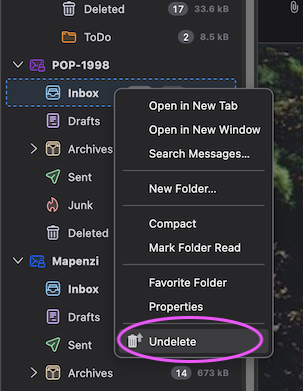
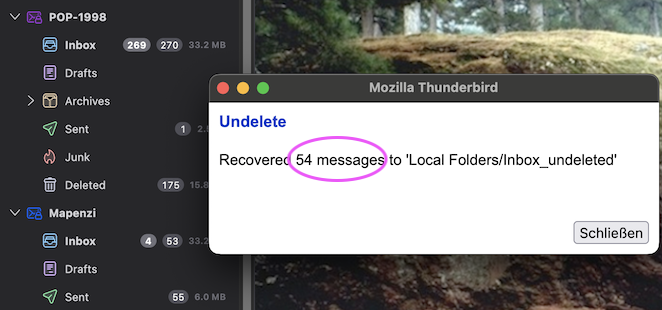
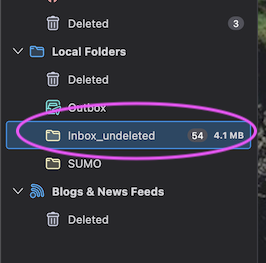
If you haven't already compacted this folder you may try to recover the deleted (> 30 days) messages with the add-on "Undelete" https://www.ggbs.de/extensions/Undelete.html I just did the following test and took several screen shots: • in Account settings > Disk Space of my POP account I activated the radio button ◉ Delete messages more than 30 days • restarted TB to verify that messages > 30d had been deleted (which was the case) • R-clicked on Inbox > Undelete (image) • got a pop-up saying that 54 messages had been recovered to "LocalFolders/Inbox_undeleted" (image) • verified in Local Folders and found the folder containing 54 recovered messages (images)
Modified by Mapenzi
I apologize. I think I've hit a brick wall. I can't find the "undelete" add on when searching Add on and Themes in Thunderbird. When I click the link that you've provided and try to open the xpi file it prompts me for an app to use. I picked NotePad but that's when I hit the wall. What do I do next? How do I get it to work with Thunderbird?
Mapenzi...you don't need to respond because I don't want to waste all your time. You've been very responsive to my issues and I appreciate all the help that you've provided.
Thank you.
Andre
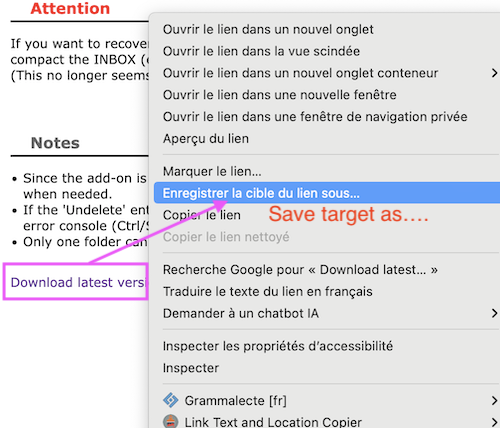
Andre, I have plenty of time and you won't waste it! To download the add-on "Undelete" from https://www.ggbs.de/extensions/Undelete.html R-click on "Download latest version" and choose "Save target as..." in the context menu. You'll get a file "Undelete-current.xpi" which you must import in the Add-ons Manager of your Thunderbird: open the Add-ons Manager, click on the cogwheel symbol, select "Install Add-on From File" and navigate to the add-on .xpi file you'd just downloaded....
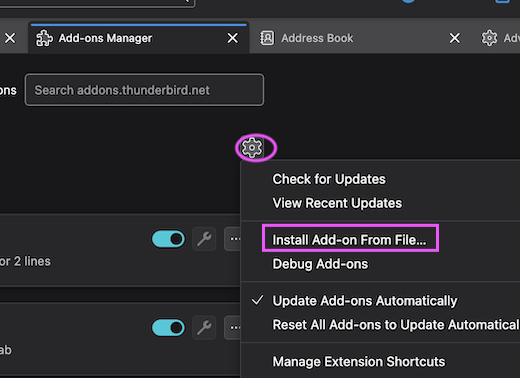
Modified by Mapenzi
Mapenzi
Everything worked out just fine. I went through all my folders and recovered tons of emails. Thank you so much for all your help and thanks for putting up with me.
Have a great day.
Andre