I get the notification "https://caldev.1und1.de verlangt einen Benutzernamen und ein Passwort" This Information cannot be given because the 1und1 Mail-Adress has been deletet and does not exist anymore. How can the notification be stopped?

Attached a screenshot showing the problem I have with Notification that a Name and password should be entered?

Chosen solution
https://en.wikipedia.org/wiki/CalDAV for information on calDav
Just to be sure, if you rightclick on your calendars and choose Properties, wat is noted at the line Location, is is maybe a server you had deleted?
Otherwise go to the thunderbird settings. scroll down on the General page and select Config Editor (please reed the linked document), tick "show only modified preferences and type uri in the search, do do see a reference to that server? if not type server into the search
Read this answer in context 👍 0All Replies (15)
It look like you have still a calendar active who want to reach that account. -click on the icon topleft in your screen and select calendar or pres ALT+3 -is the calendar listed there?
Hi Maks, tks for your reply, but my Prob is not solved. The calender is aktiv but everything is normal. Do you have another solution?
I didnt even know there was a caldev.1und1.de calender. When I open ther calender I see the "mein Kalender an Standard Kalender thats all. Wenn i want to aktivate from Standard calender to my Kalender, I have to prove my rights and enter Name and Password. And that is the problem. I habe to enter the "https://caldav.1und1.de Username and Password. But 1und1.de daoes not exist any more ;-(
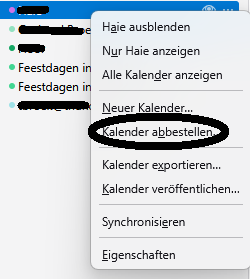
If i understand it right, when you click on "mein kalender" you get the question to login. If that is the case and you don't use that calendar you can rightclick on "mein kalendar" en choose "unsubscribe calendar"
No, I do not think it a "Kalender" Problem. It´s a problem if a accout is deletet completly (gg.keller@online.de) It seens there are still "leftovers" which are found when I open the Thunderbird program or whant to make changes. the Accout gg.keller@online.de was the first accout i opend in thunderbird and all settings werde made with this account. Then I made up 3 new eMail accounts with different providers (web, gmx und posteo) . In July 2025 I deleted the onlne.de account ans since then I have this "caldev-Problem".
Chosen Solution
https://en.wikipedia.org/wiki/CalDAV for information on calDav
Just to be sure, if you rightclick on your calendars and choose Properties, wat is noted at the line Location, is is maybe a server you had deleted?
Otherwise go to the thunderbird settings. scroll down on the General page and select Config Editor (please reed the linked document), tick "show only modified preferences and type uri in the search, do do see a reference to that server? if not type server into the search
Q: do do see a reference to that server? if not type server into the search A: No, reference to the 1und1 server.
Tere is no way to search.
Pls take into consideration. I have the german page layout and its quite difficult for me to find my way around looking for english terms eg. "search " = "suchen"
Mad Maks antwort 12/9/25, 09:02
Wenn ich es richtig verstehe, wenn Sie auf "Mein Kalender" klicken, erhalten Sie die Frage zum Login. Wenn dies der Fall ist und Sie diesen Kalender nicht verwenden, können Sie mit der rechten Maustaste auf "mein kalendar" klicken und "Kalender abbestellen" auswählen
Meine Antwort hierauf: Ich erhalte die Frage zum Login nicht nur beim Aufruf des Kalenders sondern auch wenn ich Thunderbird zum ersten mal am Tag öffne oder nach dem Schließen und dann wieder Öffnen von Thunderbird. Aber auch wenn ich im Kalender von "Standardkalender" auf "Mein Kalender" wechsele und diesen dan "Aktivieren" möchte erfolgt die "https://caldav.1und1.de " Eingabeaufforderung von Name und Passswort.
Ich hoffe I habe mein Problrem jetzt beesser erklärt
Georg said
Meine Antwort hierauf: Ich erhalte die Frage zum Login nicht nur beim Aufruf des Kalenders sondern auch wenn ich Thunderbird zum ersten mal am Tag öffne oder nach dem Schließen und dann wieder Öffnen von Thunderbird.
Das ist richtig, Thunderbird überprüft beim Start auch die Kalender.
Aber auch wenn ich im Kalender von "Standardkalender" auf "Mein Kalender" wechsele und diesen dan "Aktivieren" möchte erfolgt die "https://caldav.1und1.de " Eingabeaufforderung von Name und Passswort.
Mein Kalender nutzt diesen Server. Sie können dies überprüfen, indem Sie mit der rechten Maustaste auf den Kalender klicken und „Eigenschaften“ auswählen.
Die angegebene Adresse führt zu dem Server, auf dem Sie sich nicht anmelden können.
Ich empfehle Ihnen, diesen Kalender zu löschen, indem Sie auf „Kalender abbestellen“ klicken.
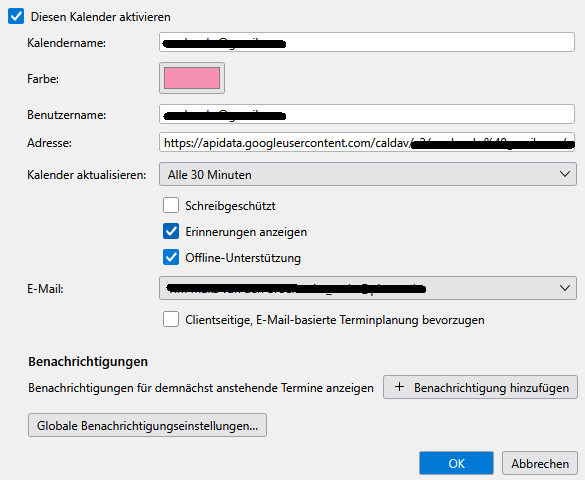
Korrekt, ich sehe "Die angegebene Adresse" und sie "führt zu dem Server, auf dem Sie sich nicht anmelden können." Der ganze angezeigter Block "Kalender bearbeiten" ist aber nicht aktiviert. Um diesen zu aktivieren muss ich links obeen "Diesen Kalender aktivieren" anklicken. Dann kann ich vermutlich den angezeigten Benutzername gg.keller@online.de und die Adresse: https://caldav.1und1.dev ..... löschen.
Wenn ich das mache, wie erhalte ich dann eine aktiven kalender mit meiner eMail-Adresse?
Ergänzung: Die Adresse https://caldav.1und1.de/begenda/dav/1834dad6-bdcb-4c1c-afb1-c652 läst sich nicht lödchen oder ändern. Nur der Benutzername kann gelödscht werden. Wenn ich dann OK drücke, dann erscheeint dass Authentifierungsfenster wieder mit caldav.1und1.de ......
Ich dreh bald durch ;-)
Nochmals, es ist am besten, wenn Sie diesen Kalender löschen und dann einen neuen erstellen.
Aber das geht doch nicht. wenn ich den kalender löschen will, dann muss ich dem Löschvorgang verifizieren !!!! das verifizieren geht nicht da ich Adresse https://caldav.1und1.de/begenda/dav/1834dad6-bdcb-4c1c-afb1-c652 nicht habe. 1und1 existiert nicht mehr !!!!!
Hast du auf „Kalender abbestellen“ geklickt, wie im Bild? Ich glaube, wir reden aneinander vorbei.