


local folders on new PC - missing structure and files

Hi, I've set up TB successfully on a new PC and been using it a while. Then I noticed my local folders archive group of subfolders was missing. I followed some instructions about moving local folders file across from the old to the new version.
Now I see the individual archive folders without the folder group name 'archive'.
Also, there are a couple of other files not visible on the new platform although they were in the original installation local files and were copied across.
I was careful to ensure the same version running on both PCs. Also that TB was closed when copying files across.
Any pointers appreciated!
All Replies (25)
Thanks for you help and patience!
The problem may be now solved. I copied the whole profile folder from the old PC to the new, replacing what was on the new PC. The local folders look like they were before.
Thanks for you help and patience!
The problem may be now solved. I copied the whole profile folder from the old PC to the new, replacing what was on the new PC. The local folders look like they were before.
This was an excellent idea! You still had the profile on the old PC as a backup. Nevertheless this is a big surprise for me since we already had copied the Local Folders from your old PC to the new PC and the problem was still the same. And I was beginning to run mad because this was incomprehensible. So what was so different in your "incomplete Local Folders" case between copying the whole profile and the whole Local Folders, except for the fact that migrating the whole Thunderbird folder (containing all user data) is the recommended procedure?
Would you mind to show me a new screen shot with the actual contents of your Local Folders in Mail? I still would like to unveil this mystery....
Modified by Mapenzi
Here's screenshots of the folder contents and the view in TB. I think it is the same as on the older set-up.
There must be some related information in other files in the profile which we don't know about!
Thanks for your help.
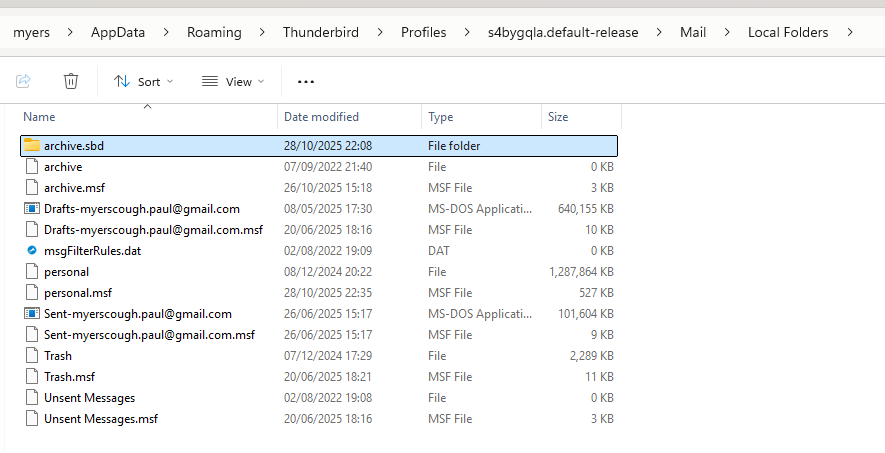
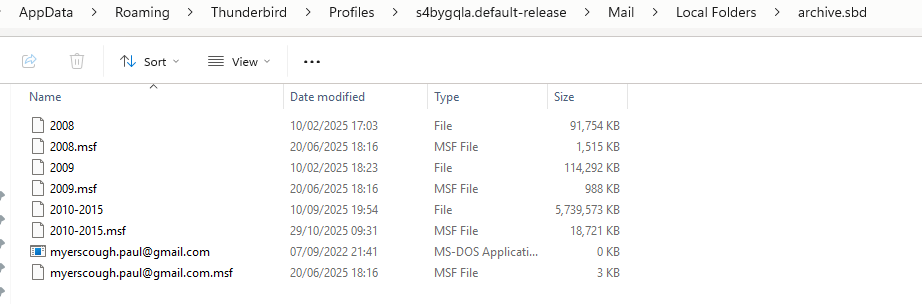
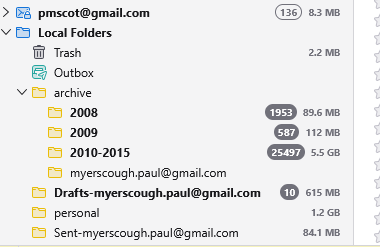
Thank you for the new images.
The reason for the dysfunctional Local Folders display will stay a mystery.myerscough.paul said
There must be some related information in other files in the profile which we don't know about!
I wonder in which file that information might be stored since I have never seen a case like yours in my experience with restoring profiles. I still hope to read commentaries of some helpers in this forum.