


Download Pane & Library UI no longer displays download speed and size of download

How do I restore the display of this vital information? Why was it removed in the first place???
Information that is missing: - Time elapsed since download began (and time remaining if file size is known) - Amount downloaded - Total size of the file being downloaded (if known) - Download speed
Edit: This is at least the case for downloads where the conclusion results in the file being opened, instead of saved: https://cdn.discordapp.com/attachments/628080126630035466/993530387601043557/unknown.png
Modified by Franpa
Chosen solution
I'm thinking the confusion is stemming from a download where Firefox did not know the final size of the file, why it doesn't show the download speed in this scenario is anybodies guess.
Read this answer in context 👍 0All Replies (4)


Hi Franpa , The Downloads Panel shows your download rate. See image -
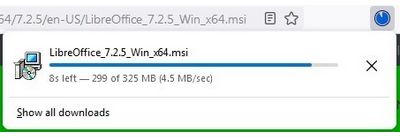
Try downloading a file that's configured to Open when download completes.
RobertJ said
Hi Franpa , The Downloads Panel shows your download rate. See image -
Here is how it looks for me: https://cdn.discordapp.com/attachments/628080126630035466/993530387601043557/unknown.png in the pane and in the Library.
Chosen Solution
I'm thinking the confusion is stemming from a download where Firefox did not know the final size of the file, why it doesn't show the download speed in this scenario is anybodies guess.