


incoming email size and attachment image storage and efficiency

hello, i cannot seem to find a solution online, hopefully someone can help.
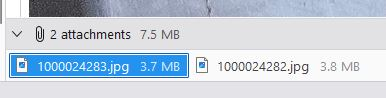
i often receive emails with images attached, and most of the time people don't resize their images. you can imagine over time this all adds up in the email storage folder total size.
i dont always need to keep a 6mb image version, it can be reduced after i am done.
i would like a method to resize the received emails image attachment, to at least still have a smaller copy for refence, but not end up with a huge thunderbird email account profile (in the email received not externally saved)
preferably a one click solution, or even a routine i can run on the file system, etc. or some way to edit the received email and its attachment in program.
thanks
All Replies (7)
This is a duplicate of https://support.mozilla.org/en-US/questions/1570091 please stay with original thread
david said
This is a duplicate of https://support.mozilla.org/en-US/questions/1570091 please stay with original thread
this is a new question with better details so its not misunderstood, as the other post seems to be people thinking its a external resize.
It's the same question which means I had to go and read the other question otherwise I may end repeating everything. There is a reason for maintaining conversation continuity. If you feel the information is not what you were looking for then it's helpful to say it in the original question which I belive you did. Then others may join in to offer further info if they can see an alternative.
When someone sends an image as an attachment, it is sent as part of the email. It is not a separate file in an email, but it can be separated from the email. To perform any alteration to any Attachment, it must be saved to a folder on your computer and then opened and edited by a suitable program. I believe you have already been informed about this.
Personally, I do not keep large attachments in an email for many obvious reasons. As you say, it's not convenient to have large mbox files or maybe you use IMAP and would like to improve the available quota.
But, I do like to maintain a specific link to any attachment AND I want that link to be easily found in email via the 'Attachment' option.
So I do this:
- Right click on Attachment and select 'Detach' (because I want to set up a file link)
Choose where to save Attachment and yes, I do have a folder in my Documents called 'TB Attachments', so I can also easily perform backups and all attachments are located outside of Thunderbird but in a folder I can easily access. It will warn you that the attachment has been deleted from the email. That's ok.
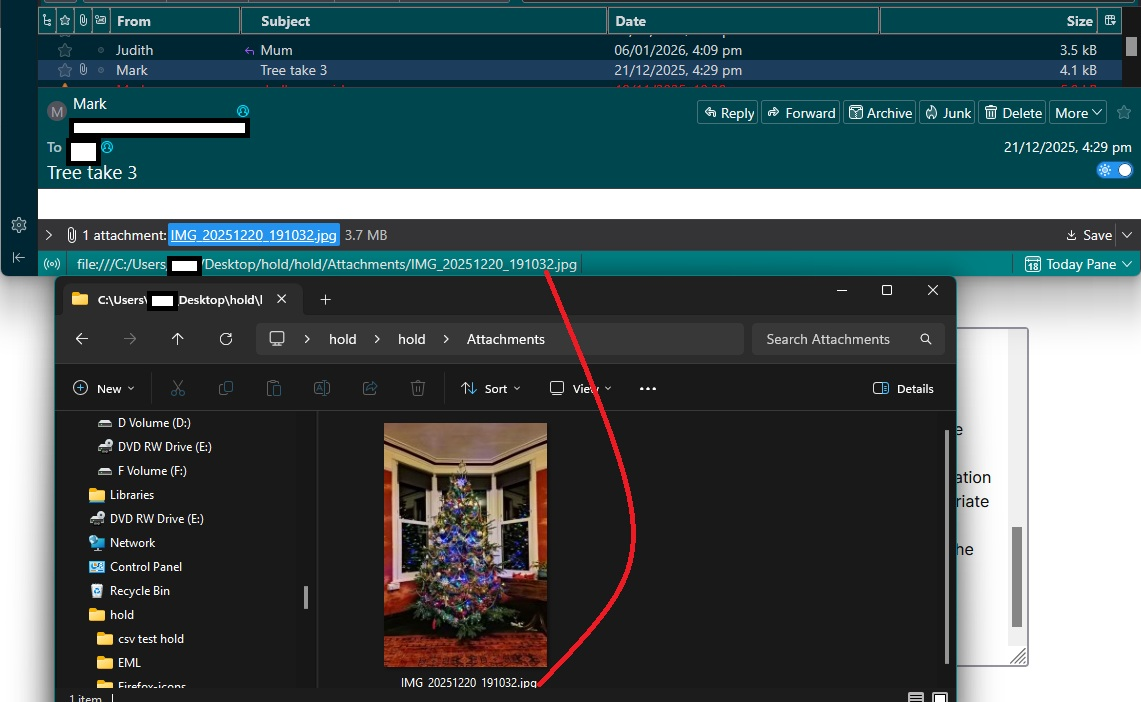
What does this achieve? Email is still accessible. The size of email has reduced considerably. This saves much mail storage space especially if you use IMAP, but equally benificial if using Pop. The 'Attachment' is still mentioned at bottom of email which is desirable, but now it points to the file location where I saved it. So when I click on Attachment, it opens the saved image file immediately using appropriate program. It's like I had done nothing. In addition, if I really want the image to be reduced, I can use a suitable image editing program to alter the saved/detached image - but do not alter the filename etc as it's important to maintain the link.
I've added an image below which shows an email with a 'detached' attachment. When you hover over the attachment you can see the file location in the bottom Status bar and I've also shown location of saved image - it's my xmas tree from last xmas :)
Alternatives to save space on computer either only download headers, so email is downloaded to a temp folder for viewing when selected. OR perhaps better still - download full copies , but set a date restriction. Example senario:
- Account Settings > Synchronisation & Storage
- Click on 'Advanced' and check folder is selected for full copy download.
- Select 'Synchronise the most recent 60 days'
Make sure to compact folders on a frequent regular basis to ensure the mbox files really do only store eg: 60 days. Do not worry - headers are still kept, so your Message List will still show all emails, but the mail storage in mbox files is restricted to keep full copies for a short period. (Note - you must compact to help maintain it).
This will always give you access to emails and attachments, but will save storage space on computer. It will not do anything to what is stored on server.
Thanks for that, Toad-Hall. This thread is a keeper and I've copied the URL. :)
It's the same question which means I had to go and read the other question otherwise I may end repeating everything.
- there was no need to read the other question (i did not mention it) as this post is more clear and direct, without peoples comments of misunderstanding it. i did notice afterwards that the original post can be edited (something most forums don't allow).
When someone sends an image as an attachment, it is sent as part of the email. It is not a separate file in an email, but it can be separated from the email. - while i do understand how the email is received, my question is more so to edit the individual email message after it is received (for example separate image, edit image size and put back in) then automate this with an -add on.
"detach method" - this is an option, but not the best solution. - it does have the problem of linking issues, if moving TB to a new PC/OS (having to match save paths) - not being able to put the image back into the email after it is detached. - not being able to edit the path of the detached image
In addition, if I really want the image to be reduced, I can use a suitable image editing program to alter the saved/detached image - but do not alter the filename etc as it's important to maintain the link. - while this is an option, i think TB really needs a way to better manage space these days as attachments are getting much larger than in the past
"Alternatives to save space on computer" - i need full local copies and records of emails. not partial downloads etc.
i am sure, i am not the only one who hates getting huge image attachments from people who don't manage their image sizes before sending. and the last thing i want to do is spend time on a whole process to reduce that size.
is there a way to edit the received email. remove the attachment, resize it and put it back in? if so there may be a place for an -add on to help with the efficiency of that job.
if using the detach method, there needs to be better management options with the path not restricted to the /user/ folder or a drive letter, etc. (mass edit path) it would be a decent option for large videos and files, but ultimately keeping images in the email would be neater option if possible.
thanks
also thinking about this a little more, and the current functions of TB, the following could be an implemented solution:
either when email messages are received or by user command: - detach attachments into an *attachments* folder located in a *relative path* (%APPDATA%\Thunderbird\Profiles\) in the TB *profile*.
i did come across these addon that may give this ideas function a possibility. https://addons.thunderbird.net/en-US/thunderbird/addon/opendetachedattachments/ https://addons.thunderbird.net/en-US/thunderbird/addon/attachment-saver/ https://addons.thunderbird.net/en-US/thunderbird/addon/attachment-grabber-bulk-save/ https://addons.thunderbird.net/en-US/thunderbird/addon/extract-em/
this should help protect from TB moves, updates, etc. and keep everything in TB which is good for backups and keeping order.
the user can keep attachments as they are in the *attachments* folder, or for example run a batch resizer on the images, etc.
this way the speed and size of mail-box files don't get out of control, and management of attachments (which do make up the bulk of the size) can be easily handled and not locked to the message and mbox file.
there may be a compatibility issue with later moving to other mail programs, but i am not sure of the details about that without testing.
let me know if this makes sense?
thanks
When a question or comment is posted that relates to similar question, it's wise to check it out as information may be relevant.
The bottom line is this - you cannot edit any attachment eg: reduce size of an attachment; attached in the received mail and keep it in place as attachment in email as it currently exists.
Here is a Workaround if you really need to edit images and retain as attached to original copy. It's not pretty and not so simple as using 'Detach', but it's an option.
- Save attachment to desktop
- edit image - use a program to reduce it's size and resave it.
- Select original email and click on 'Forward'
- You now have the option to edit original message - allowing you to remove one attachment and attach the reduce attachment.
- Forward original email to yourself
- The 'Forward' option means it retains the original sender details. eg: date sent and whom it's from.
Downside - it means you would lose the 'From' original sender in header, but it would be included within the email. You could part edit the 'Subject' by appending original From data. Just in case it helps with search criteria. It means you need to resend emails, depending upon the number you are talking about, this might impact on any daily allowance or bandwidth. If only the odd one then that may not be relevant.
If you are repeatedly getting large image files from only a few people then it might benefit both sender and receiver if you asked them to reduce size before sending.