


MAJOR network connections error dialog prompted by Add-ons in Mozilla Firefox v24.0. Please assist???

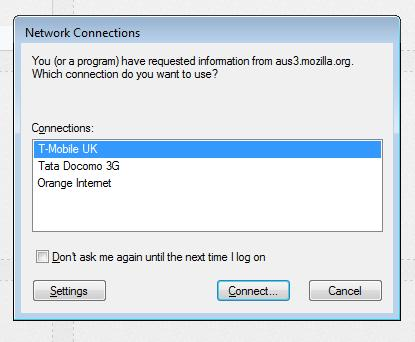
Firefox for Windows updated on my machine. However, since updating to the current v24.0, I keep receiving a 'Network Connections' dialog box which states "You (or a program) have requested information from "aus3.mozilla.org" and/or "versioncheck-bg.addons.mozilla.org". Which connection do you want to use?"......The various options within the Connections options given do not include my broadband connection which means I cannot eliminate this dialog box from repeatedly showing everytime I visit any website.
I have selected 'Don't ask me again until the next time I log on', however, the dialog box repeatedly opens on selecting any particular webpage to view. My connection is stable and I don't have any malware reported as confirmed by Spybot-S&D and MalwareBytes Anti-Malware packages. Nor do I have any viruses reported by AVG Internet Security 2013. In fact, there are no errors in the registry at all.
Please assist as soon as possible!
Όλες οι απαντήσεις (3)
Have uploaded a screen image of the error dialog window I am confronted with
Did you check the advanced network settings
- Network Connections > Advanced > Advanced Settings
You can also check the LAN settings in the Control Panel?
- Control Panel > Internet Options > Connections: LAN Settings
- Control Panel > Internet Options > Connections: select your connection and click the Setting button
Yes, I checked this already and everything is showing as connected appropriately.