


How do I get Bing to stop loading in a new tab?

I had Google as my home page and when I would open a new tab it's blank but when I updated my Divx player it set Bing as my homepage and loaded Bing when I open a new tab. I have Google as my homepage and it comes up when I open a new window but when I open a new tab it still goes to Bing. How do I disable this so a blank page comes up again?
Επιλεγμένη λύση
This worked - thank you!
Helpful replies
Ok, so, this problem has nothing to do with any add-ons or extensions. I tried everything possible in the options to stop bing from showing up in a new tab when i opened. Then i went onto other options. Here's how i fixed it.
open a new tab and in the address bar type: about:config Click the button that says I promise I'll be careful. in the search bar, type: newtab it's the third option down that says searchinnewtabeenabledbyuser. double click on it and where it says "true", type "false". Restart firefox. your problem should be fixed. Hope this helps other extremely frustrated firefox users. Mozilla!!!! WAKE UP!!! No one like bing!!!!!
Προβολή απάντησης εντός συζήτησης 👍 2Όλες οι απαντήσεις (7)
Hello,
Check if you don't have any Bing add-on installed. If so, disable it. You can find your extensions in the menu > Add-ons > Extensions.
Soif
MikeJ:
See - http://forums.divx.com/divx/topics/update_messed_up_ie
- first reply by Krista should solve the problem
Other - You need to check your Plugins and update as needed.
- Check your Plugins - https://www.mozilla.org/en-US/plugincheck/
- Shockwave Flash 11.6 r602
- If you have IE installed you need to go to the Flash download page with both IE and Firefox so that both get updated. IE has a separate Flash version (ActiveX) than other browsers that use the Plugin version.
- https://support.mozilla.org/en-US/kb/keep-flash-up-to-date-and-troubleshoot-problems
- https://support.mozilla.org/en-US/kb/install-flash-plugin-view-videos-animations-games
- Adobe PDF Plug-In For Firefox and Netscape "9.5.3"
Ok, so, this problem has nothing to do with any add-ons or extensions. I tried everything possible in the options to stop bing from showing up in a new tab when i opened. Then i went onto other options. Here's how i fixed it.
open a new tab and in the address bar type: about:config Click the button that says I promise I'll be careful. in the search bar, type: newtab it's the third option down that says searchinnewtabeenabledbyuser. double click on it and where it says "true", type "false". Restart firefox. your problem should be fixed. Hope this helps other extremely frustrated firefox users. Mozilla!!!! WAKE UP!!! No one like bing!!!!!
Thank you! I had to go in and click "false" on three similar searchinnewtabeenabledbyuser lines until it worked, but >the system seemed to speed up and the graphics improved as well! Happy, happy, happy, joy, joy, joy! Gator
Επιλεγμένη λύση
This worked - thank you!
Helpful replies
Ok, so, this problem has nothing to do with any add-ons or extensions. I tried everything possible in the options to stop bing from showing up in a new tab when i opened. Then i went onto other options. Here's how i fixed it.
open a new tab and in the address bar type: about:config Click the button that says I promise I'll be careful. in the search bar, type: newtab it's the third option down that says searchinnewtabeenabledbyuser. double click on it and where it says "true", type "false". Restart firefox. your problem should be fixed. Hope this helps other extremely frustrated firefox users. Mozilla!!!! WAKE UP!!! No one like bing!!!!!
just download search protect and youre good to go. Everytime you find Bing or any other ******* websearch click that ann safe your settings for home page AND new tab.
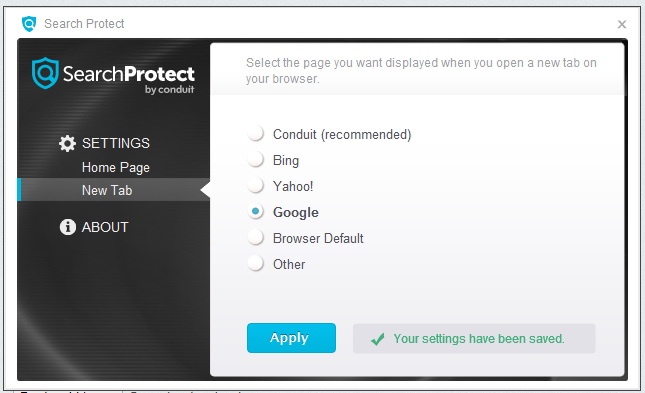
None of the solutions worked.
I think this problem arises when Win8 accelerates longing on to a public wifi. it shoots up the provider's logon, then jumps to Bing.com even though I have set a different home page and have deleted Bing as a search provider.