


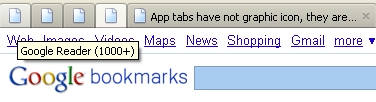
App tabs have not graphic icon, they are all blank white, no gmail, facebook, twitter. They are all exactly the same. Quit FF, refreshed page,... stood on head... nada

'pin as app tab' turns the wide tab to a small tab. But there is no identifying icon - they are all identical. The default 'white page of paper with dogear upper right' is all I see.
Όλες οι απαντήσεις (2)
The whole functionality of "App Tabs" is pointless if the icons don't show. Just lost all apps tabs in a crash, had to open them again. Now, none of them have an icon (GReader, GMail, GBookmarks, YMail, etc). How should one remember which is which is there are more than 5-6 tabs? Does it have something to do with what is cleared up when closing FF (cache, offline data)? PS: Just now, noticed that favicons don't show in the normal tabs as well - at least for now.
Sorry, Mozilla, NVM. Turns out the cause was the addon Favicon Picker. Disabled it (replaced with Bookmark Favicon Changer), and now all icons show ok (app tabs, normal tabs). Yaay, me=happy!!