

Αυτό το νήμα αρχειοθετήθηκε.
Κάντε νέα ερώτηση αν χρειάζεστε βοήθεια.

Αρχειοθετήθηκε
Modify Next/Previous Tab Keyboard Shortcut

I am on a mac and I hate that ALT+TAB needs to be used to swap in between tabs...
How hard is it for you to add the following? SHIFT+COMMAND+[RIGHT ARROW]: go to next active tab SHIFT+COMMAND+[LEFT ARROW]: go to previous active tab
These are the Mac defaults for tab-switching. If there was a menu entry, e.g. [view -> go to next tab] then you could use OSX keyboard settings to override its shortcut. But that's not the case!
I am on a mac and I hate that ALT+TAB needs to be used to swap in between tabs...
How hard is it for you to add the following?
SHIFT+COMMAND+[RIGHT ARROW]: go to next active tab
SHIFT+COMMAND+[LEFT ARROW]: go to previous active tab
These are the Mac defaults for tab-switching. If there was a menu entry, e.g. [view -> go to next tab] then you could use OSX keyboard settings to override its shortcut. But that's not the case!
Όλες οι απαντήσεις (2)
Two months and no reply - can't wait anymore =)
Wrote a tiny plugin for this: http://firefox.dreadatour.ru/tabs-navigation-menu/
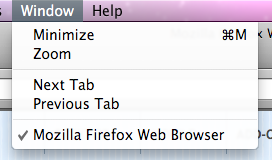
It is vexing, but addon is not works, becouse there is a bug in Firefox: https://bugzilla.mozilla.org/show_bug.cgi?id=429824