


firefox 4 bookmark toolbar does not show at startup

My home page does not load and the bookmark tool bar does not show at start-up. My home page is set in options and the show bookmarks toolbar is checked. Any ideas? Thanks
Όλες οι απαντήσεις (3)
Had this problem, changed via Tools Options etc. What worked for me was to find my desired homepage TAB and then drag it to home page icon and drop it. Like Dorothy and Toto did to the witch. Its still working for me. Post ur attempts.
Τροποποιήθηκε στις από τον/την Tony N.
Using the same Profile with both 3.6.15 and 4.0 can cause problems.
Create a new profile exclusively for the 4.0 beta version and create a desktop shortcut with -P "profile" appended to the target to launch that profile.
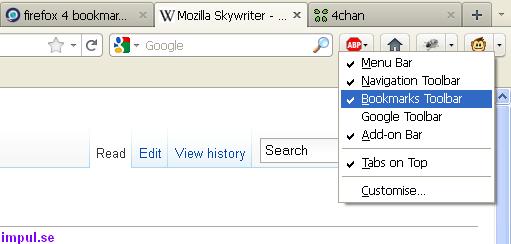
Mozilla Firefox 4 does not automatically show the Bookmarks Toolbar.
What you need to do is right-click on the blank space on your existing toolbar, and select Bookmarks Toolbar.
moderator deleted an unnecessary hyperlink
Τροποποιήθηκε στις από τον/την the-edmeister