


Unable to log-in to Spotify using Firefox ver 156.0

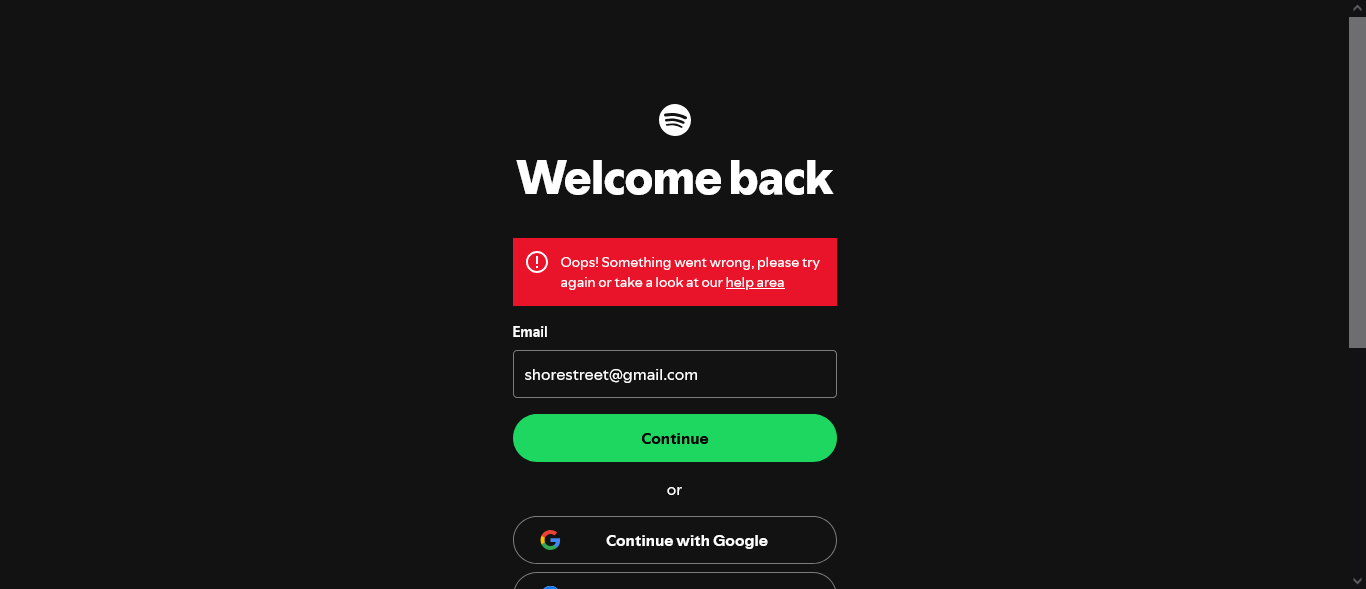
Problem originates when trying to log-in to Spotify account at https://accounts.spotify.com. The next page in the log-in sequence, a Captcha screen, is blocked and a red bar under "Welcome back" is displayed with the text "Oops! Something went wrong, please try again or take a look at our help area" - see the attached screenshot
Clearing the browser cache, restarting Firefox, disconnecting a VPN, or disabling browser extesions had no effect. Enhanced Tracking Protection is set at Standard.
Clearing the browser caches again and running Firefox in Troubleshoot Mode disabled all extensions but delivered the same outcome - a red bar and the next page blocked.
This appears to be specifically an issue within Firefox or its settings as Spotify is accessible using Edge (which I prefer to keep in the box) with the same extensions enabled and a VPN connected.
Is there a setting that is causing access to the Captcha screen?
Όλες οι απαντήσεις (1)
Usually not, but make sure your antivirus/malware/phishing is not poking its nose into the connection, in case that trips up some security features over at spotify side.