


Google Docs not Working in Firefox

For the last 2 months, my Google docs on Firefox have basically become unusable. It won't let me access them or edit them or move them. It keeps saying I'm disconnected even though I'm not. I have updated my settings a million times, cleared cache, re-installed Firefox and sacrificed goats. Nothing is working. If this keeps up, I will not be able to use this browser at all, because most of my clients require me to work in shared Google docs.
Όλες οι απαντήσεις (1)
Hi leslie, sorry to hear that. Most probably this is caused by an extension, so let's do this: Try Firefox Troubleshoot Mode to see if the problem goes away. Firefox Troubleshoot Mode (previously known as Firefox Safe Mode) is a special diagnostic mode that temporarily turns off hardware acceleration, disables add-ons (extensions and themes) and resets some settings. See the Use Troubleshoot Mode in Firefox article for details.
If Firefox is open, you can restart in Firefox Troubleshoot Mode from the Help menu:
- Click the menu button
 , click Help, select Troubleshoot Mode and click Restart in the "Restart Firefox in Troubleshoot Mode?" dialog that opens.
If Firefox is not running, you can start Firefox in Troubleshoot Mode as follows:
- On Windows: Hold the Shift key when you open the Firefox desktop or Start menu shortcut.
- On Mac: Hold the option key while starting Firefox.
- On Linux: Quit Firefox, go to your Terminal and run firefox -safe-mode
(you may need to specify the Firefox installation path e.g. /usr/lib/firefox)
When the Firefox Troubleshoot Mode window appears, select "Open".
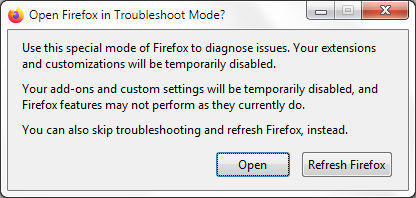
If the issue is not present in Firefox Troubleshoot Mode, your problem is probably caused by an extension, theme or hardware acceleration. Please follow the steps in the Troubleshoot extensions, themes and hardware acceleration issues to solve common Firefox problems article to find the cause.
To exit Firefox Troubleshoot Mode, just close Firefox and wait a few seconds before opening Firefox for normal use again. (If you can't exit Firefox Troubleshoot Mode, please see Firefox is stuck in Troubleshoot Mode).
When you figure out what's causing your issues, please let us know. It might help others with the same problem.