


Why is my account still active and syncing in private browsing mode?

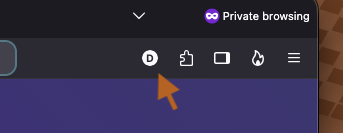
When I switch to Private Browsing mode, I still see the icon showing I'm logged into my account, and if I click it, it says it's still syncing and stuff. Why is my account even there in private browsing? The private browsing shouldn't even know I have an account, or even be able to be logged into an account at all, much less still be syncing. I shouldn't even be seeing that little icon at all.
Όλες οι απαντήσεις (13)
I wouldn't agree. It's still syncing your bookmarks and passwords in the Private Mode.
Wouldn't agree with what? My question wasn't asking for an opinion. I asked why is it there, and syncing, while in private browsing mode.
I answered that your bookmarks and passwords added or removed in the Private Mode are still being synced.
Τροποποιήθηκε στις από τον/την TyDraniu
That still doesn't answer my question. I'm asking why it's there and syncing when it shouldn't be. Private browsing mode shouldn't be syncing anything. It shouldn't even have access to any account. It shouldn't even be able to be logged into any account at all.

David, you will have noticed that the private windows will show all your bookmarks, as there is no special private set. And any bookmark added or deleted in a private window will remain added / deleted the next time that you open a normal window.
If Sync was turned off in private windows then any changes made to non-private data such as bookmarks or settings might not sync until the next time that a normal window is opened (which could be hours later, or longer).
I don't want any of that in private browsing mode. Private browsing should be private, but if it has access to any of my account info, it's not private. It shouldn't even have that ability afaic.
Then instead or PBM that still runs in the same profile/parent, set up a separate Profile, flip that one to "always private" mode, and use that separate isolated profile instead of the original PBM if you truly need this separation. Everything's in there, everything's configurable…
David, could you clarify what you object to precisely?
Is it that a private window can access the same bookmarks, passwords and browser settings that a normal window can? Do you want a private window to start off in a clean state as if you had never used the browser before?
Or are you fine with such items appearing in private windows, you just don't want any changes to bookmarks / browser settings etc. that you make in a private window to be remembered?
Or do you not mind bookmarks or passwords added in a private window being remembered across sessions, you just don't want these specific items synced to the cloud?
Τροποποιήθηκε στις από τον/την TechHorse
My objection is that it still can sync with my account. There should not even be an account login option in private browsing. private browsing shouldn't even know there is an account.
You need to run a separate profile for that. See Manage Firefox profiles for completely isolated browser instance.
David, if you want private windows to remember their own sets of bookmarks and passwords etc., different than the ones you see in normal windows, then as jbr has suggested you will need to use a second user profile for private browsing.
Otherwise, a single user profile will share bookmarks, settings etc. across both normal and private windows. And if Sync is enabled, then it will sync changes to these without paying any attention as to whether the change was made in a normal or private window.
If Sync was automatically disabled for private windows then people might lose data. As private windows, for example, appear to share the same bookmarks set as normal windows, and so people might not expect bookmarks added to this set to disappear when the private window closes, and / or to not be saved in the cloud.
Τροποποιήθηκε στις από τον/την TechHorse
You've already explained that to me multiple time now, and I've already said multiple times now that I don't want private browsing to have access to ANY OF THAT! I don't consider having access to any account info such as bookmarks to be private.
David, then you will need to create a separate user profile for private browsing, as suggested.
There are valid usage cases for the way things currently work, but if you personally do not want this then fair enough, and hopefully you can now change things.
Τροποποιήθηκε στις από τον/την TechHorse