


Remove "Add Tab to New Group" item from Tab Context Menu

Hi All,
I would like to remove the first item from the Tab Context Menu, which is "Add Tab to New Group", and simply have "Reload Tab" as the first menu item.
I was using this code, which worked in FF 145, until the latest update (FF 147)...
#context_openANewTab,
#context_moveTabToNewGroup,
#context_moveTabToGroup,
#context_ungroupTab + menuseparator {
   display: none !important;
}
However, now there is an extra separator line at the top of the menu (see attached images).
This code also removes the top menu item, but still leaves the separator line on top:
#tabContextMenu #context_moveTabToNewGroup {
  display: none !important;
}
Is there a way to remove the first menu item without adding the separator line?
Thanks!
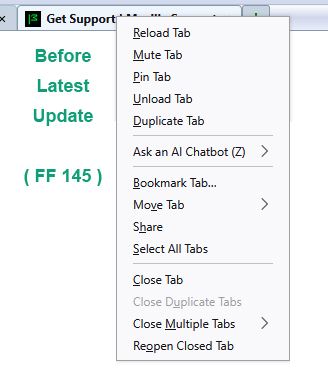
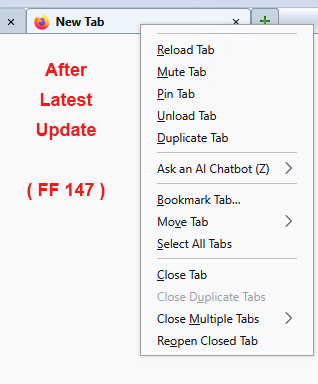
Τροποποιήθηκε στις από τον/την Slouch
Όλες οι απαντήσεις (2)
If you don't use the tab group feature you can disable it by going to about:config in the address bar and change browser.tabs.groups.enabled to false.
That will make that menu item go away and any others related to tab grouping.
If you do use it, then perhaps someone else can come up with the correct values.
MarkRH said
If you don't use the tab group feature you can disable it by going to about:config in the address bar and change browser.tabs.groups.enabled to false.
Thanks, MarkRH.
When I set that feature to false, it does remove those tab group menu items, however the separator line still appears at the top because I am also removing the "New Tab at Right" menu item with the following code...
#context_openANewTab, #context_openANewTab + menuseparator {
   display: none !important;
}
See attached images.
I have a feeling something changed with the last update having to do with "next-sibling combinator selectors" which refer to the separator lines, because I can't figure out how to select that stray separator.
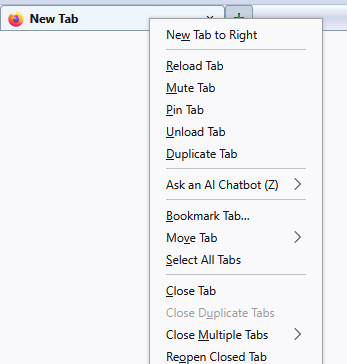
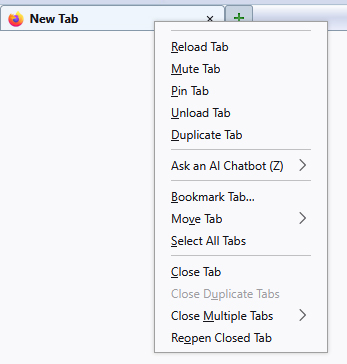
Τροποποιήθηκε στις από τον/την Slouch