


Windows 10 reached EOS (end of support) on October 14, 2025. If you are on Windows 10, see this article.

Αναζήτηση στην υποστήριξη

Προσοχή στις απάτες! Δεν θα σας ζητήσουμε ποτέ να καλέσετε ή να στείλετε μήνυμα σε κάποιον αριθμό τηλεφώνου ή να μοιραστείτε προσωπικά δεδομένα. Αναφέρετε τυχόν ύποπτη δραστηριότητα μέσω της επιλογής «Αναφορά παραβίασης».

Μάθετε περισσότερα

Search bar suggestions from my history still showing

  • 1 απάντηση
  • 0 έχουν αυτό το πρόβλημα
  • 98 προβολές
  • Τελευταία απάντηση από Mark

So, I configured the suggestions in the search bar so that nothing from my history/previous searches is displayed (see attached image with current settings). However, suggestions from my past searches still continue to appear. I would like only the autocomplete suggestions from my search engine to appear (I'm using Kagi). I already tried to delete my browsing history (Crtl + Shift + Delete - Everything, browsing and download history), it deleted everything but my past searches... Can somebody help me?

Thanks! attachments: (search suggestions settings, search suggestions appearing now)
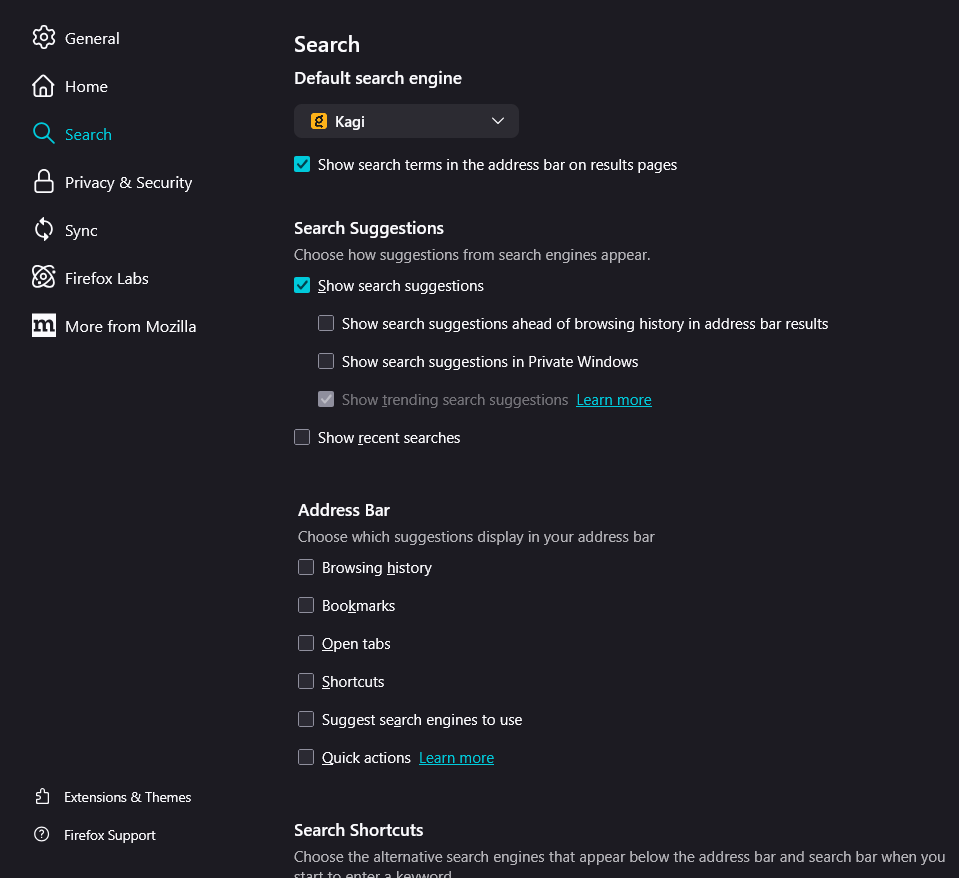
So, I configured the suggestions in the search bar so that nothing from my history/previous searches is displayed (see attached image with current settings). However, suggestions from my past searches still continue to appear. I would like only the autocomplete suggestions from my search engine to appear (I'm using Kagi). I already tried to delete my browsing history (Crtl + Shift + Delete - Everything, browsing and download history), it deleted everything but my past searches... Can somebody help me? Thanks! attachments: (search suggestions settings, search suggestions appearing now)

Συνημμένα στιγμιότυπα

Όλες οι απαντήσεις (1)

"If it has the little clock icon (Search & Form History), you should be able to remove it using the keyboard: down arrow to select it and then Shift+Delete to flush it." I took this from https://old.reddit.com/r/firefox/comments/1go866a/deleting_history_doesnt_delete_search_history/lwmm13k/

You could additionally try clearing Saved Form Info in the Clear Browsing Data section, that might include previous searches.

Υποβολή ερώτησης

Πρέπει να συνδεθείτε στον λογαριασμό σας για να απαντήσετε σε δημοσιεύσεις. Ξεκινήστε μια νέα ερώτηση εάν δεν διαθέτετε ακόμα λογαριασμό.