


Windows 10 reached EOS (end of support) on October 14, 2025. If you are on Windows 10, see this article.

Αναζήτηση στην υποστήριξη

Προσοχή στις απάτες! Δεν θα σας ζητήσουμε ποτέ να καλέσετε ή να στείλετε μήνυμα σε κάποιον αριθμό τηλεφώνου ή να μοιραστείτε προσωπικά δεδομένα. Αναφέρετε τυχόν ύποπτη δραστηριότητα μέσω της επιλογής «Αναφορά παραβίασης».

Μάθετε περισσότερα

It is impossible to edit the standard search engine

  • 1 απάντηση
  • 0 έχουν αυτό το πρόβλημα
  • 74 προβολές
  • Τελευταία απάντηση από TyDraniu

I wanted to set keywords for search engines (in order to quickly change them for a single query). This cannot be done for search engines by default (why?), so I had to delete them and create a new one with the same link and my own keywords. But now I can't give them the same name back, firefox says that such a search engine already exists. In general, it doesn't matter to me which letter is there. The main purpose of my appeal is to draw attention to the fact that search engines cannot be edited by default, because it is quite inconvenient. Thanks for the answer (I apologize in advance if I made a grammatical mistake somewhere, I used a translator) My OS: Ubuntu 24.04 LTS; firefox version: 145.0.2 (64-bit)
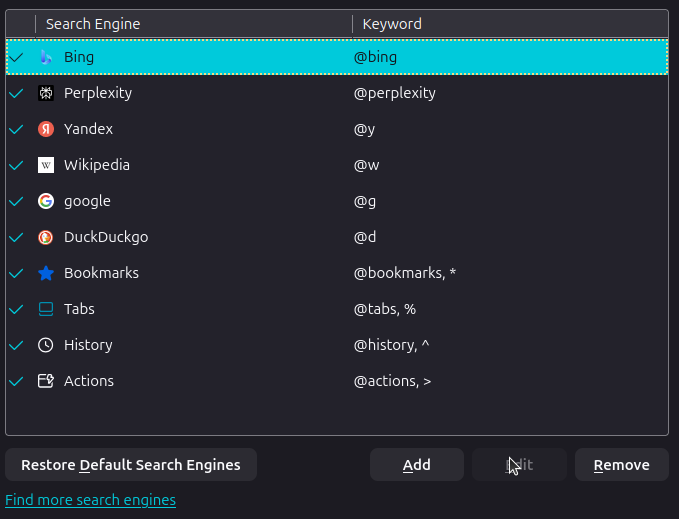
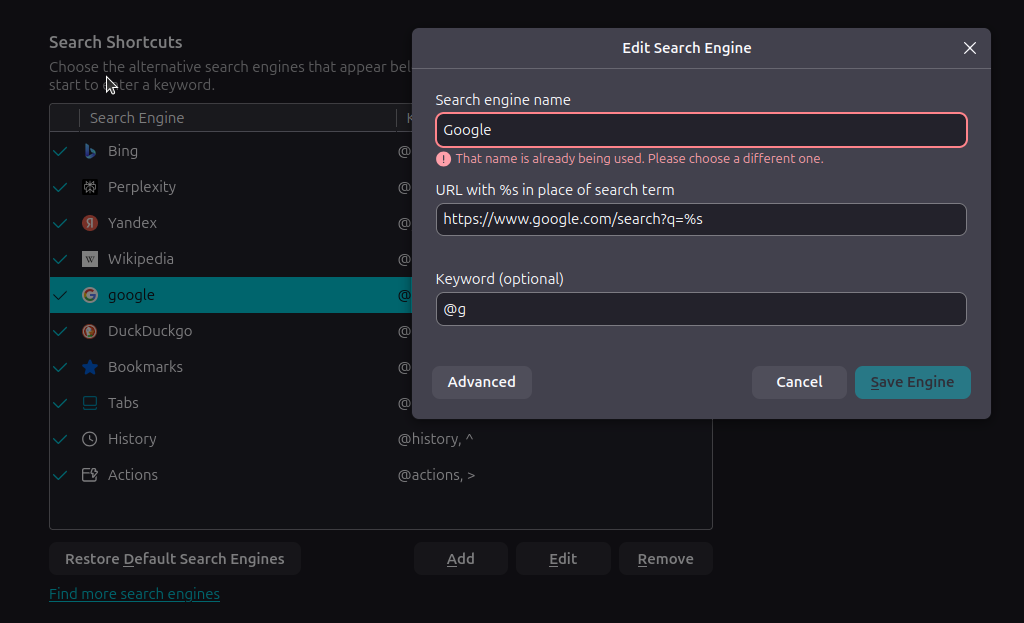
I wanted to set keywords for search engines (in order to quickly change them for a single query). This cannot be done for search engines by default (why?), so I had to delete them and create a new one with the same link and my own keywords. But now I can't give them the same name back, firefox says that such a search engine already exists. In general, it doesn't matter to me which letter is there. The main purpose of my appeal is to draw attention to the fact that search engines cannot be edited by default, because it is quite inconvenient. Thanks for the answer (I apologize in advance if I made a grammatical mistake somewhere, I used a translator) My OS: Ubuntu 24.04 LTS; firefox version: 145.0.2 (64-bit)
Συνημμένα στιγμιότυπα

Επιλεγμένη λύση

You don't have to edit the standard search engine or create another one just to set a different keyword. Just double click in the Keyword column, where you have @google, then type in @g and press Enter. Then @g will be added to your list of keywords.

Προβολή απάντησης εντός συζήτησης 👍 1

Όλες οι απαντήσεις (1)

Επιλεγμένη λύση

You don't have to edit the standard search engine or create another one just to set a different keyword. Just double click in the Keyword column, where you have @google, then type in @g and press Enter. Then @g will be added to your list of keywords.

Υποβολή ερώτησης

Πρέπει να συνδεθείτε στον λογαριασμό σας για να απαντήσετε σε δημοσιεύσεις. Ξεκινήστε μια νέα ερώτηση εάν δεν διαθέτετε ακόμα λογαριασμό.