


Having to repeat logins on many sites

Unlike before, many sites that I visit regularly, I am now having to log in every time I visit, including support.mozilla.org.
Did I unknowingly change something, some setting? or perhaps it's due to an addon?
Όλες οι απαντήσεις (8)
As you know, you stay signed in to sites because Firefox sends them the cookies they set during previous page views. There are many possible reasons for cookies to be deleted or missing when you visit a site. The reasons could be related to Firefox deleting cookies when it closes, or using the site in a private window (those cookies aren't saved to disk) or in a container, etc. Can you provide more information about when the problem arises?
jscher2000 - Support Volunteer said
As you know, you stay signed in to sites because Firefox sends them the cookies they set during previous page views. There are many possible reasons for cookies to be deleted or missing when you visit a site. The reasons could be related to Firefox deleting cookies when it closes, or using the site in a private window (those cookies aren't saved to disk) or in a container, etc. Can you provide more information about when the problem arises?
I have the Cookiebro cookie manager. As you probably know, the toolbar button menu lets you establish a whitelist. All these sites are on the whitelist.
I also use the Clear Browsing Data addon. It is set to clear cache and cookies, but only for the past hour.
On this site, https://support.mozilla.org, until today, for at least a month now, it's been happening
I could understand maybe you inadvertently clearing your cache and cookies, causing you to re-login one time, but how do we explain having had to log in every time I go to these regularly visited sites.
One example would be the Tenforums https://www.tenforums.com/. I generally never have to log in there
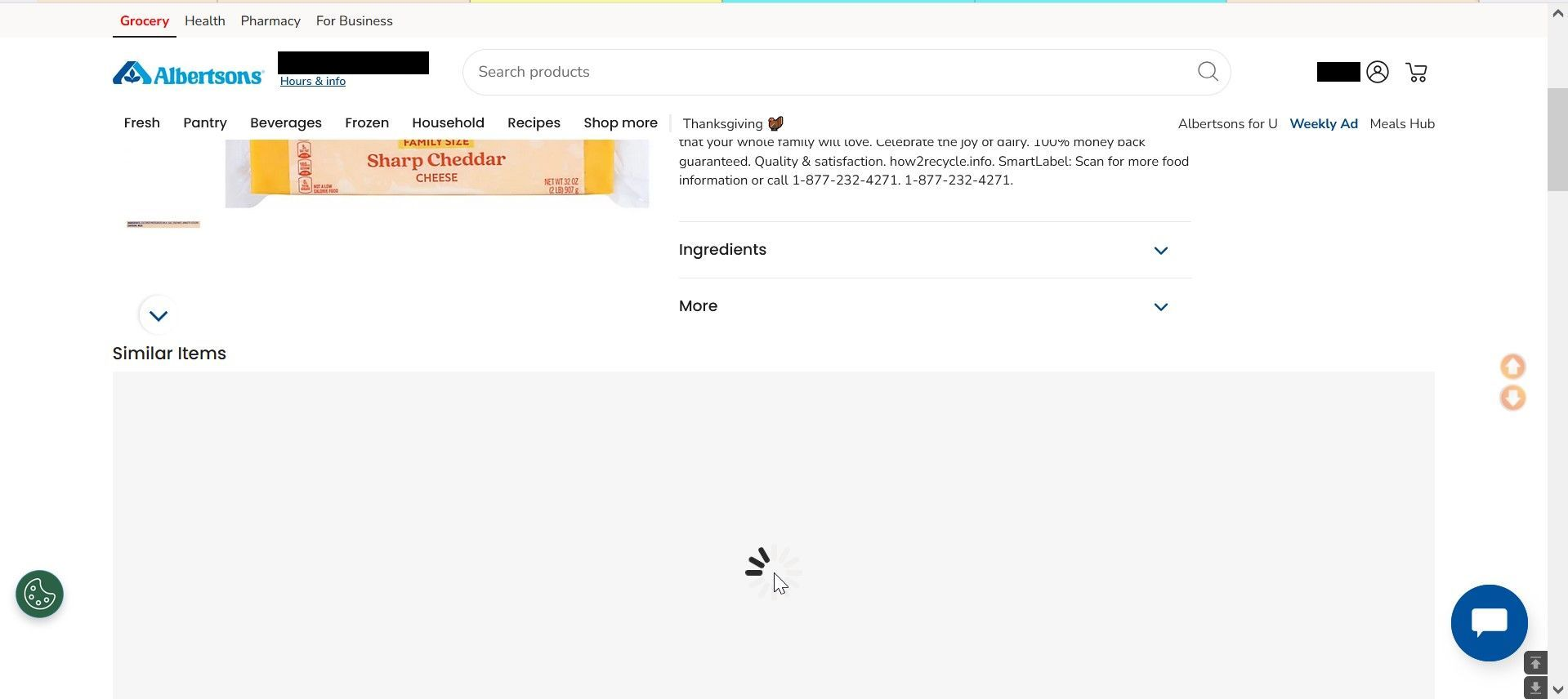
This is another site with the login problem. A nationwide supermarket. https://www.albertsons.com/shop/product-details.237050087.html. Also, I've mentioned this before. I don't know if it's cookies related, but I get irregular behavior on some sites, like this one, seems like more often lately, and I must reluctantly use Chrome to work those sites. What you see here is a page that will not load that "Similar Items" section. The cursor is hovering over what can be described as a perpetually spinning gear.
jscher2000 - Support Volunteer said
As you know, you stay signed in to sites because Firefox sends them the cookies they set during previous page views. There are many possible reasons for cookies to be deleted or missing when you visit a site. The reasons could be related to Firefox deleting cookies when it closes, or using the site in a private window (those cookies aren't saved to disk) or in a container, etc. Can you provide more information about when the problem arises?I just ran Firefox in troubleshoot mode. That supermarket website I mentioned still behaves the same way. I had the same issues with this site quite a while ago, then they stopped.
Is there anything that can be done to make this websites, and other websites that have an incompatibility with Firefox, usable? Is there a Firefox setting I can alter?
Τροποποιήθηκε στις από τον/την noel_envode
jscher2000 - Support Volunteer said
As you know, you stay signed in to sites because Firefox sends them the cookies they set during previous page views. There are many possible reasons for cookies to be deleted or missing when you visit a site. The reasons could be related to Firefox deleting cookies when it closes, or using the site in a private window (those cookies aren't saved to disk) or in a container, etc. Can you provide more information about when the problem arises?How do I stay logged in here?
noel_envode said
I also use the Clear Browsing Data addon. It is set to clear cache and cookies, but only for the past hour.
I don't think that extension honors exceptions: https://github.com/dessant/clear-browsing-data/issues/29
I also don't know what the past hour means for cookies. Does it clear all cookies that have been "accessed" during the past hour? Could that include a cookie updated whenever Sync runs?
Also, I've mentioned this before. I don't know if it's cookies related, but I get irregular behavior on some sites, like this one, seems like more often lately, and I must reluctantly use Chrome to work those sites. What you see here is a page that will not load that "Similar Items" section. The cursor is hovering over what can be described as a perpetually spinning gear.
Have you tried disabling Tracking Protection on the site to see whether that makes any difference? Click the shield icon toward the left end of the address bar (next to the lock). On the drop-down panel, click the blue slider switch to disable protection. Firefox usually reloads the page, but you also can try reloading bypassing the cache (Ctrl+Shift+R).
Any difference?
jscher2000 - Support Volunteer said
I don't think that extension honors exceptions: https://github.com/dessant/clear-browsing-data/issues/29All I can say is that I've been using that addon for years with no problems. If you are referring to browser sync, it is disabled.
Also, I've mentioned this before. I don't know if it's cookies related, but I get irregular behavior on some sites, like this one, seems like more often lately, and I must reluctantly use Chrome to work those sites. What you see here is a page that will not load that "Similar Items" section. The cursor is hovering over what can be described as a perpetually spinning gear.
jscher2000 - Support Volunteer said
Have you tried disabling Tracking Protection on the site to see whether that makes any difference? Click the shield icon toward the left end of the address bar (next to the lock). On the drop-down panel, click the blue slider switch to disable protection. Firefox usually reloads the page, but you also can try reloading bypassing the cache (Ctrl+Shift+R). Any difference?It seems to be working here. We'll seems how consistent things are elsewhere.
I've noticed that many websites now prompt for qualified cookie acceptance choices. I always opt for the minimal required option.
Do you think that may be contributing to my problem?
Τροποποιήθηκε στις από τον/την noel_envode
noel_envode said
I've noticed that many websites now prompt for qualified cookie acceptance choices. I always opt for the minimal required option. Do you think that may be contributing to my problem?
No, as long as you accept "essential" cookies (this is EU GDRP lingo, I think), the site should work normally. If you decline all cookies, then features like a shopping cart that needs to collect data across pages may stop working, but individual pages should still be readable.
jscher2000 - Support Volunteer said
Have you tried disabling Tracking Protection on the site to see whether that makes any difference? Click the shield icon toward the left end of the address bar (next to the lock). On the drop-down panel, click the blue slider switch to disable protection. Firefox usually reloads the page, but you also can try reloading bypassing the cache (Ctrl+Shift+R). Any difference?I thought it worked here, but today I had to login again.