


Remove autofill email addresses from FF Browser in Sequoia

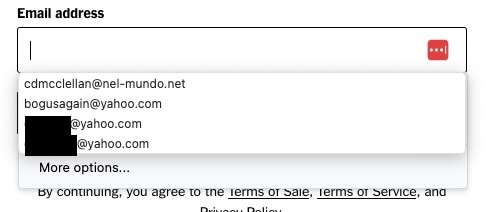
When I sign in to the NY Times (for example) I get a dropdown of autofill email addresses. Some are even mistyped addresses or bogus addresses I've used to access webpages that'll take any email address. I cannot delete these. I've tried shift-delete. These email addresses cannot be accessed via Firefox preferences: autofill screens do not list email addresses but only the physical addresses that I've saved.
(And then, of course, the minute you submit any email to the NYTimes it immediately creates an "account" and starts sending you subscription offers.)
Επιλεγμένη λύση
That isn't the solution. I had tried it before. Also, I have Firefox set to clear everything, including "Saved Form Info" upon exit. However, I did get rid of the saved addresses by selecting them from the dropdown and then doing something which I don't remember and didn't document (but it wasn't hitting any of the delete key though.)
Clicking "solved the problem" although the solution is still not known.
Προβολή απάντησης εντός συζήτησης 👍 1Όλες οι απαντήσεις (2)

Could you try going to Firefox settings -> Type "clear browsing" in search -> Click on Clear browsing data -> Select "Saved form info" and clear?
Επιλεγμένη λύση
That isn't the solution. I had tried it before. Also, I have Firefox set to clear everything, including "Saved Form Info" upon exit. However, I did get rid of the saved addresses by selecting them from the dropdown and then doing something which I don't remember and didn't document (but it wasn't hitting any of the delete key though.)
Clicking "solved the problem" although the solution is still not known.