


Ciao - I HAVE TO LEAVE FIREFOX

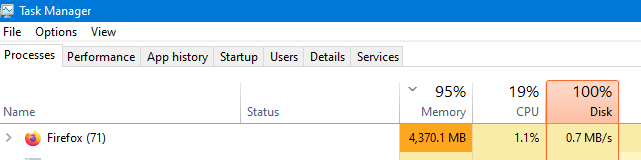
I AM SENDING TWO SCREENSHOTS IN ORDER FOR YOU TO SEE WHY I AM SAYING GOOD BYE TO FIREFOX OVER 4000 OF RESOURCES AS YOU CAN SEE AND FIREFOX HAD 4 TABS OPEN ALL OF THEN JUST OPENED UP SO THEY WERE NOT YET CONNECTED TO ANY WEBPAGE.
I CANNOT SPEND HOURS TRYING TO FIX THIS
SO I AM MOVING TO ANOTHER BROWSER
I JUST WANTED TO SAY CIAO

Όλες οι απαντήσεις (3)
Hi
We would be happy to help look into this further if you wish.
I sent in the screenshots so you could see what I saw. If there is a way to fix this then let me know. In my experience with support folks the next events often require hours of work on my part and that is not going to be agreed to by me. If you have a way to help that would be fine.
I was hoping for some kind of comment on the question as to why with only four empty tabs open it showed over 70 instances of Firefox activity in the Task Manager, also showing that Firefox was using over 4000 of resources and rendering my Laptop un-usable.
I would like some kind of feedback on that if you wish to go forward

One thing you can do is go to about:processes on a new tab and see how the four tabs are taking up so much of your memory. If you have any extensions, those may be affecting the amount of resources Firefox is taking up, and you can also check those in about:processes.