


password help to many

With the password settings for my domain, it seems to count the saved passwords as if they are for the same account, even though they are different. It also doesn’t show an image or label to indicate which account each password belongs to.
Τροποποιήθηκε στις από τον/την Archer Charteris
Όλες οι απαντήσεις (4)
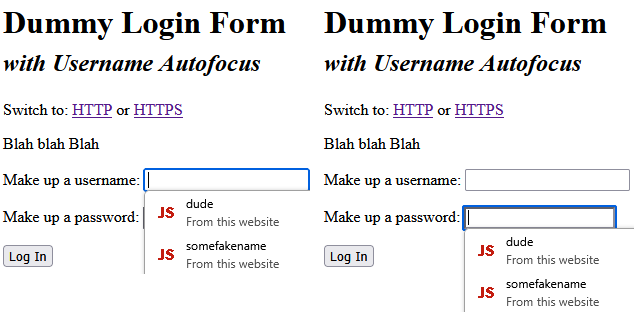
I'm not 100% sure what you mean by "account" here. A password is associated with a username, and on the drop-down menu that lets you choose among multiple logins for a site, it should show the username, not the password. I'm attaching a screenshot as an example. Are you seeing something different?
You probably noticed that Firefox displays suggestions based on the base domain name (example.com), which includes all subdomains (www.example.com, accounting.example.com). If you do not want to see logins from subdomains, there is a hidden setting for that:
(1) In a new tab, type or paste about:config in the address bar and press Enter/Return. Click the button accepting the risk.
More info on about:config: Configuration Editor for Firefox. The moderators would like us to remind you that changes made through this back door aren't fully supported and aren't guaranteed to continue working in the future.
(2) In the search box in the page, type or paste signon.includeOtherSubdomainsInLookup and pause while the list is filtered
(3) Double-click the preference to switch the value from true to false (if you change your mind later, come back and double-click it again)
Yes but see I'm on mobile I I can't seem to get to about:config it's fine on desktop cause it show the a little image of where I saved it
Oh, sorry, I missed that. I'll tag this thread for someone to move it over to the mobile forum.
Nah all good just forgot say that I was using mobile lol sorry