


Firefox in Linux system - how to export & install security certificate

Subject: Urgent Assistance Needed with Certificate Installation
Dear Team,
I hope this message finds you well. I am in urgent need of assistance regarding a Linux-based system where we have the Firefox browser installed. I need to establish a secure connection with one of my servers, which requires the installation of a certificate.
However, I am unable to locate the certificate export button in the certificate view or anywhere else in the browser. I have tried several methods without success.
Could you please help me with this issue as soon as possible? Your guidance would be greatly appreciated.
Thank you very much!
Best regards, Kishor
Επιλεγμένη λύση
I SAW THE INSTRUCTIONS ON HOW TO DOWN LOAD AND INSTALL FIREFOX DEVELOPER IN LINUX SYSTEM
Προβολή απάντησης εντός συζήτησης 👍 0Όλες οι απαντήσεις (5)

UPDATED: You don't see the cert in this window? see screenshot
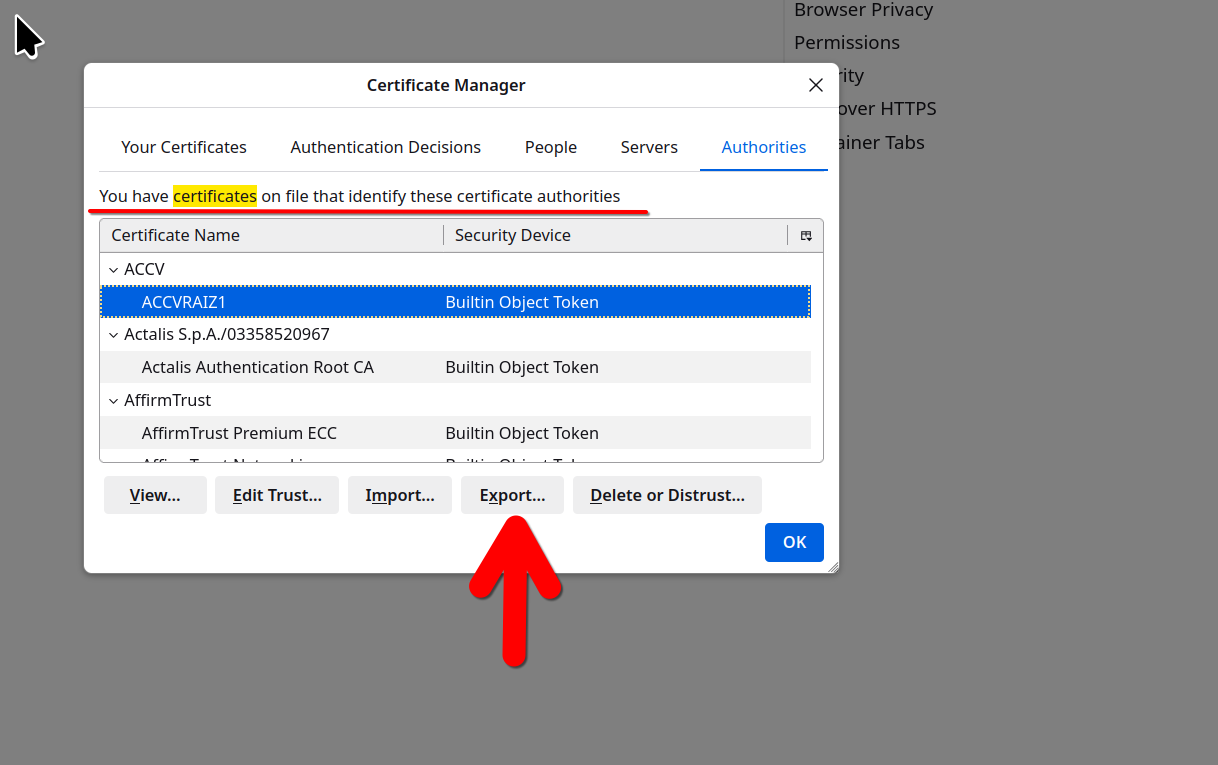
Τροποποιήθηκε στις από τον/την jonzn4SUSE
I can not see certificate in this windows
Wow. What OS? What version of Firefox? How about downloading Firefox from Mozilla, run firefox-bin from the folder and see if you have the same issue. https://www.mozilla.org/en-US/firefox/all/#product-desktop-release
Just results found on the interwebs... Import self-signed certificate in Firefox on the command line? https://forums.rockylinux.org/t/import-self-signed-certificate-in-firefox-on-the-command-line/13150/1
import Certificate in Firefox browser on Ubuntu OS https://supportportal.juniper.net/s/article/Import-Certificate-in-Firefox-browser-on-Ubuntu-OS?language=en_US
I have a Siemens HMI with the type number MTP1000. It has Firefox installed and is running on an industrial operating system, with Firefox version 136. I'm attempting to access UMC from this browser, but it shows a message indicating that the site is insecure. To resolve this, I need to install a security certificate. However, I cannot find the export button in the "View Certificate" window, unlike in the Chrome browser. I hope this clarifies the situation.

Επιλεγμένη λύση
I SAW THE INSTRUCTIONS ON HOW TO DOWN LOAD AND INSTALL FIREFOX DEVELOPER IN LINUX SYSTEM