


I need to set keyboard shortcut for going to previous/next tab on MacOS

Hi,
On MacOS, in order to set keyboard shortcut, I need to know the exact name for the feature. But I can't find tab navigations in Firefox's menu.
For example, in Chrome, they have a menu called "Tab" and there is "Select Next Tab" and "Select Previous Tab" in the menu. That are the names I need to set keyboard shortcut. But I can't find the equivalent in Firefox.
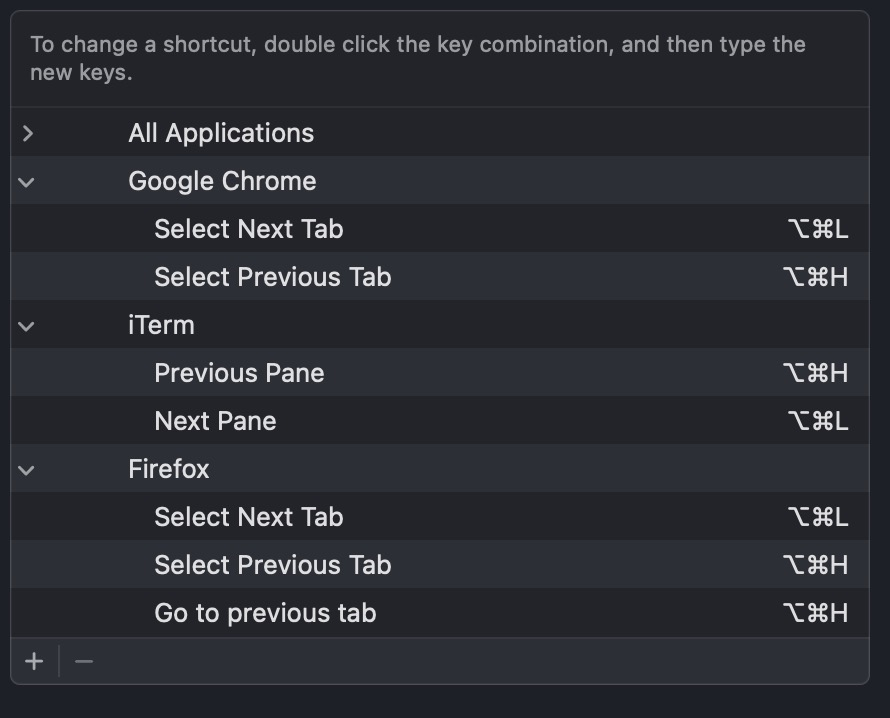
From the screenshot, the keyboard shortcut works for Chrome, but not working for Firefox as I don't have the exact name for tab navigation.
Hi,
On MacOS, in order to set keyboard shortcut, I need to know the exact name for the feature. But I can't find tab navigations in Firefox's menu.
For example, in Chrome, they have a menu called "Tab" and there is "Select Next Tab" and "Select Previous Tab" in the menu. That are the names I need to set keyboard shortcut. But I can't find the equivalent in Firefox.
From the screenshot, the keyboard shortcut works for Chrome, but not working for Firefox as I don't have the exact name for tab navigation.
Όλες οι απαντήσεις (1)

Firefox browser has a standard hotkeys anything that changes that is 3rd party apps.