


Screen Time site blocker stopped working on Firefox

Hello,
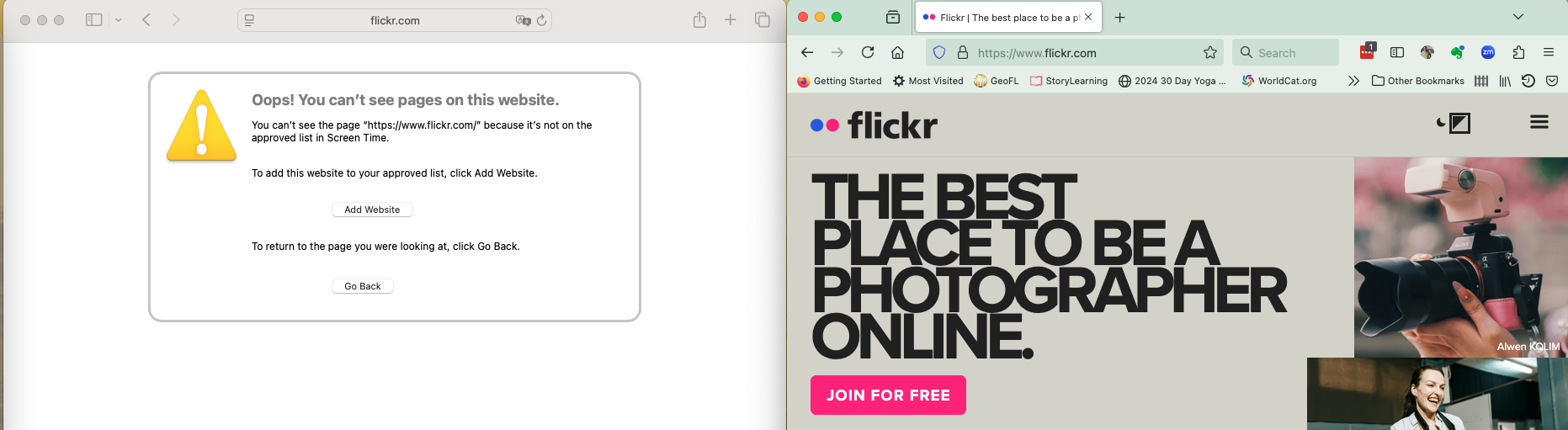
I use Screen Time to block sites on my Mac, running Sequoia 15.1.1. For some reason, it recently (within the last 2 weeks or so) stopped blocking sites on Firefox 134.0.2, but not on Safari.
Is this a known issue? Is there a solution?
Thank you for your help.
Όλες οι απαντήσεις (2)

That's something you have to contact their help about.
First a disclaimer: I use Windows, so what I know about Screen Time is based on web searches.
As far as I can tell, Firefox does not have built-in integration with Screen Time. I wonder whether your Firefox "DNS over HTTPS" setting changed, bypassing a method MacOS uses to enforce Screen Time restrictions? To turn off DNS over HTTPS, see the following article:
Configure DNS over HTTPS protection levels in Firefox (choose Off)
Does that make any difference? You may need to test with a different site or in a private window (Command+Shift+P) to avoid Firefox using the address it already looked up