


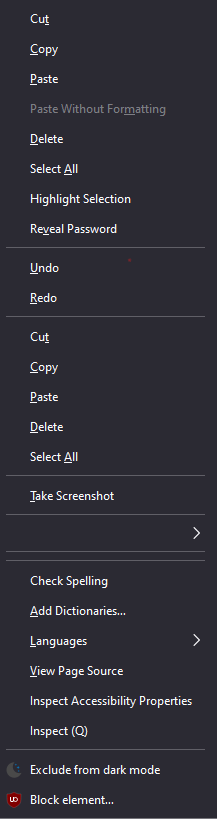
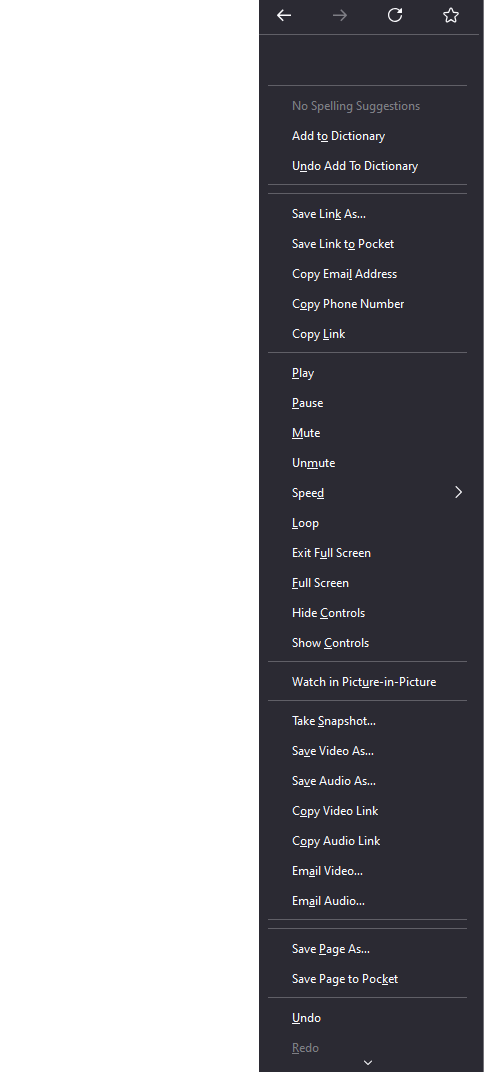
Right-click brings up 1000% options than required, none of which work.

Right-clicking on a page, image, link or whatnot, to copy/paste text/image/link is outright impossible. Only Ctrl+C & Ctrl+V somewhat save the day, but that's not enough.
Image attached shows the menu that pops-up after right-clicking. It's so long it doesn't fit on the page and has its own scroll-wheel within itself.
No options or help were found in the settings or on forums.
Right-clicking on a page, image, link or whatnot, to copy/paste text/image/link is outright impossible. Only Ctrl+C & Ctrl+V somewhat save the day, but that's not enough.
Image attached shows the menu that pops-up after right-clicking. It's so long it doesn't fit on the page and has its own scroll-wheel within itself.
No options or help were found in the settings or on forums.
Όλες οι απαντήσεις (4)
It looks like something with a theme or a custom userChrome.css file.
I'm on DuckDuckGo; Cannot be a Chromium issue.
TyDraniu said
It looks like something with a theme or a custom userChrome.css file.
I'm on DuckDuckGo; Cannot be a Chromium issue.
Try to remove the search.json.mozlz4 from your profile (with closed Firefox).
Τροποποιήθηκε στις από τον/την TyDraniu