


Profile keeps corrupting
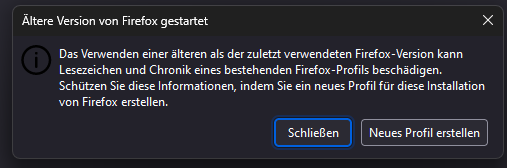
Hello everyone! I keep running into problems with my Firefox account. I have just recently switched to firefox and in the few days that I have been using the browser it keeps crashing on me with the reasoning of my profile being corrupted. I will attach an image of the error message below (Unfortunately it is in German, but it roughly translates to: "The use of a older Firefox-Version can lead to corrupt bookmarks and chronics of the Firefox-Profile. Protect this information, by making a new profile for this installation of Firefox.") What I tried to fix this issue: - Restaring Firefox (Message persists) - Reinstalling Firefox - Reinstalling Firefox after deleting all files
Both firefox reinstallations were with the newest version. The profile that I made for Firefox was made just a few days ago, so I am very confused how this can already be so corrupted. I hope there is something I can do to fix this, I am really enjoying this browser. (;′⌒`) Greetings, Leonie
Όλες οι απαντήσεις (3)

Hello. I believe you will have to create a new profile. Backup your bookmarks or the current profile first.
https://support.mozilla.org/en-US/kb/export-firefox-bookmarks-to-backup-or-transfer https://support.mozilla.org/en-US/kb/back-and-restore-information-firefox-profiles
Greetings
Another user seems to have the same issue.
Firefox shows this notification warning if you try to start this profile with an older version than last used this profile.
This info is stored in compatibility.ini in the Firefox profile folder.
- C:\Users\<user>\AppData\Roaming\Mozilla\Firefox\Profiles\