


Join us to show up for other Firefox users 🦊. Earn fun badges and Mozilla swag vouchers! Find out more: https://mzl.la/askafox150

Windows 10 reached EOS (end of support) on October 14, 2025. If you are on Windows 10, see this article.

Αναζήτηση στην υποστήριξη

Προσοχή στις απάτες! Δεν θα σας ζητήσουμε ποτέ να καλέσετε ή να στείλετε μήνυμα σε κάποιον αριθμό τηλεφώνου ή να μοιραστείτε προσωπικά δεδομένα. Αναφέρετε τυχόν ύποπτη δραστηριότητα μέσω της επιλογής «Αναφορά παραβίασης».

Μάθετε περισσότερα

Αυτό το νήμα αρχειοθετήθηκε. Κάντε νέα ερώτηση αν χρειάζεστε βοήθεια.

Tabs bar

  • 2 απαντήσεις
  • 0 έχουν αυτό το πρόβλημα
  • 262 προβολές
  • Τελευταία απάντηση από cor-el
  • Αρχειοθετήθηκε

Hi, I use sript "hide tabs bar with only one tab" but empty tabs bar is still visible. Can someone help me?

Script:

/:root[sizemode="normal"] #nav-bar{ --uc-window-drag-space-width: 20px }

  1. titlebar{ -moz-appearance: none !important; }
  2. tabbrowser-tabs, #tabbrowser-tabs > .tabbrowser-arrowscrollbox, #tabbrowser-arrowscrollbox{ min-height: 0 !important; }
root:not([customizing]) #tabbrowser-tabs .tabs-newtab-button,
root:not([customizing]) #tabs-newtab-button,
root:not([customizing]) #TabsToolbar-customization-target > .toolbarbutton-1,
root:not([customizing]) #TabsToolbar .titlebar-button{
 -moz-appearance: none !important;
 height: 43px;
 padding-top: 0px !important;
 padding-bottom: 0px !important;
 -moz-box-align: stretch;
 margin: 0 !important;

}

root:not([customizing]) #TabsToolbar-customization-target > .toolbarbutton-1 > .toolbarbutton-icon{
 padding-block: 0px !important;
 max-height: 28px;
 height: 20px !important

}

  1. tabs-newtab-button, #alltabs-button, #tabbrowser-tabs .tabbrowser-tab:only-of-type{
 visibility: collapse !important;

}


/* TABS: bottom - Firefox 65 and later - updated for 89+ */ /* https://searchfox.org/mozilla-release/source/browser/themes/shared/tabs.inc.css */ /* https://github.com/Aris-t2/CustomCSSforFx/blob/master/classic/css/tabs/tabs_below_navigation_toolbar_fx89.css */ /* https://developer.mozilla.org/en-US/docs/Tools/Browser_Toolbox */

/* ROOT - VARS */ /* you can adjust the CSS variables until it looks correct */

  • |*:root {
 --tab-toolbar-navbar-overlap: 0px !important;
 --tab-min-height: 25px !important;
 --tab-min-width:  60px !important;
 --tab-adjust:  0px; /* adjust tab bar - only for 68-73 */
 --tab-caption: 5px; /* caption buttons on tab bar */

}

/* TAB BAR - below nav-bar */

  1. navigator-toolbox toolbar:not(#nav-bar):not(#toolbar-menubar) {-moz-box-ordinal-group:10 !important;}
  2. TabsToolbar {-moz-box-ordinal-group:1000 !important;}
  1. TabsToolbar {
 display: block !important;
 position: absolute !important;
 bottom: 0 !important;
 width: 100vw !important;

}

  1. tabbrowser-tabs {
 width: 100vw !important;

}

/* navigator-toolbox - PADDING */

  • |*:root:not([chromehidden*="toolbar"]) #navigator-toolbox {
 position: relative !important; /*89+*/
 padding-bottom: calc(var(--tab-min-height) + 1px) !important; /*ADJUST*/
 background-color: var(--toolbar-bgcolor) !important;

}

/* TabsToolbar with menubar and titlebar hidden - rules for Firefox 65-73 */

  • |*:root[tabsintitlebar]:not([inFullscreen="true"]):not([sizemode="maximized"]) #toolbar-menubar[autohide="true"] ~
#TabsToolbar{
 bottom: var(--tab-adjust); /*ADJUST*/

}

/* TABS: height */

  1. tabbrowser-tabs,
  2. tabbrowser-tabs > .tabbrowser-arrowscrollbox,

.tabbrowser-tabs[positionpinnedtabs] > .tabbrowser-tab[pinned] {

 min-height: var(--tab-min-height) !important;
 max-height: var(--tab-min-height) !important;

}

  1. TabsToolbar {
 height: var(--tab-min-height) !important;
 margin-bottom: 1px !important;
 box-shadow: ThreeDShadow 0 -1px inset, -moz-dialog 0 1px !important; /*OPTIONAL*/
 background-color: var(--toolbar-bgcolor) !important;
 color:            var(--toolbar-color) !important;

}

/* indicators *//*

  • |*:root[privatebrowsingmode=temporary] .private-browsing-indicator {
 position: absolute !important;
 display: block !important;
 right: 0px !important;
 bottom: 0px !important;
 width: 14px !important;
 pointer-events: none !important;

}

  • /

.private-browsing-indicator {display: none !important;} .accessibility-indicator {display: none !important;}

/* Indicators - HIDE *//*

  • |*:root:not([accessibilitymode]) .accessibility-indicator {display: none !important}
  • |*:root:not([privatebrowsingmode=temporary]) .private-browsing-indicator {display: none !important}
  • /

/* Drag Space */ .titlebar-spacer[type="pre-tabs"], .titlebar-spacer[type="post-tabs"] {

 width: 20px !important;

}

/* Override vertical shifts when moving a tab */

  1. navigator-toolbox[movingtab] > #titlebar > #TabsToolbar {
 padding-bottom: unset !important;

}

  1. navigator-toolbox[movingtab] #tabbrowser-tabs {
 padding-bottom: unset !important;
 margin-bottom: unset !important;

}

  1. navigator-toolbox[movingtab] > #nav-bar {
 margin-top: unset !important;

}

/* Hide window-controls and caption buttons on Tab Bar */

  1. TabsToolbar #window-controls {display: none !important;}
  2. TabsToolbar .titlebar-buttonbox-container {display: none !important;}
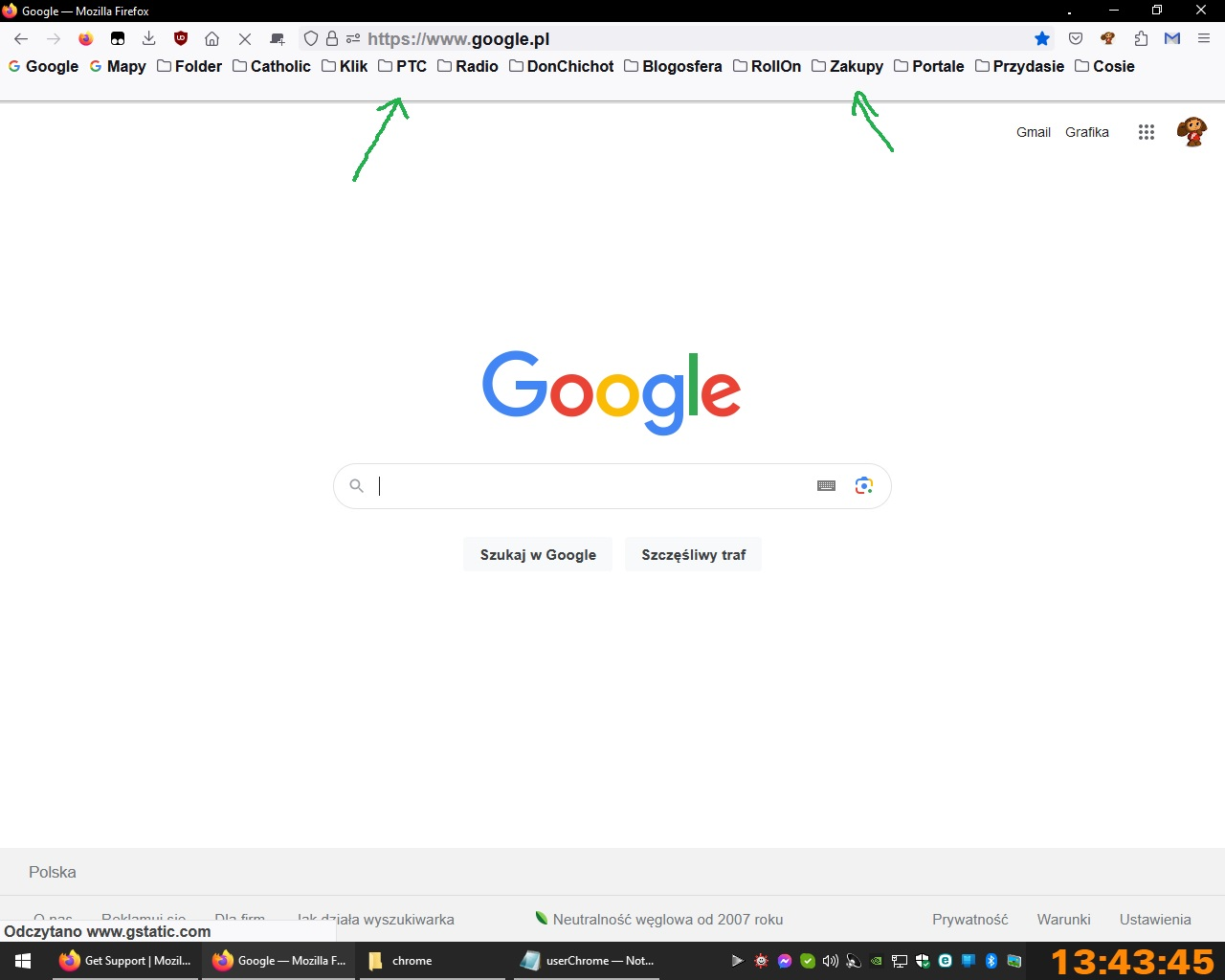
Hi, I use sript "hide tabs bar with only one tab" but empty tabs bar is still visible. Can someone help me? Script: /:root[sizemode="normal"] #nav-bar{ --uc-window-drag-space-width: 20px } #titlebar{ -moz-appearance: none !important; } #tabbrowser-tabs, #tabbrowser-tabs > .tabbrowser-arrowscrollbox, #tabbrowser-arrowscrollbox{ min-height: 0 !important; } :root:not([customizing]) #tabbrowser-tabs .tabs-newtab-button, :root:not([customizing]) #tabs-newtab-button, :root:not([customizing]) #TabsToolbar-customization-target > .toolbarbutton-1, :root:not([customizing]) #TabsToolbar .titlebar-button{ -moz-appearance: none !important; height: 43px; padding-top: 0px !important; padding-bottom: 0px !important; -moz-box-align: stretch; margin: 0 !important; } :root:not([customizing]) #TabsToolbar-customization-target > .toolbarbutton-1 > .toolbarbutton-icon{ padding-block: 0px !important; max-height: 28px; height: 20px !important } #tabs-newtab-button, #alltabs-button, #tabbrowser-tabs .tabbrowser-tab:only-of-type{ visibility: collapse !important; } /* TABS: bottom - Firefox 65 and later - updated for 89+ */ /* https://searchfox.org/mozilla-release/source/browser/themes/shared/tabs.inc.css */ /* https://github.com/Aris-t2/CustomCSSforFx/blob/master/classic/css/tabs/tabs_below_navigation_toolbar_fx89.css */ /* https://developer.mozilla.org/en-US/docs/Tools/Browser_Toolbox */ /* ROOT - VARS */ /* you can adjust the CSS variables until it looks correct */ *|*:root { --tab-toolbar-navbar-overlap: 0px !important; --tab-min-height: 25px !important; --tab-min-width: 60px !important; --tab-adjust: 0px; /* adjust tab bar - only for 68-73 */ --tab-caption: 5px; /* caption buttons on tab bar */ } /* TAB BAR - below nav-bar */ #navigator-toolbox toolbar:not(#nav-bar):not(#toolbar-menubar) {-moz-box-ordinal-group:10 !important;} #TabsToolbar {-moz-box-ordinal-group:1000 !important;} #TabsToolbar { display: block !important; position: absolute !important; bottom: 0 !important; width: 100vw !important; } #tabbrowser-tabs { width: 100vw !important; } /* navigator-toolbox - PADDING */ *|*:root:not([chromehidden*="toolbar"]) #navigator-toolbox { position: relative !important; /*89+*/ padding-bottom: calc(var(--tab-min-height) + 1px) !important; /*ADJUST*/ background-color: var(--toolbar-bgcolor) !important; } /* TabsToolbar with menubar and titlebar hidden - rules for Firefox 65-73 */ *|*:root[tabsintitlebar]:not([inFullscreen="true"]):not([sizemode="maximized"]) #toolbar-menubar[autohide="true"] ~ #TabsToolbar{ bottom: var(--tab-adjust); /*ADJUST*/ } /* TABS: height */ #tabbrowser-tabs, #tabbrowser-tabs > .tabbrowser-arrowscrollbox, .tabbrowser-tabs[positionpinnedtabs] > .tabbrowser-tab[pinned] { min-height: var(--tab-min-height) !important; max-height: var(--tab-min-height) !important; } #TabsToolbar { height: var(--tab-min-height) !important; margin-bottom: 1px !important; box-shadow: ThreeDShadow 0 -1px inset, -moz-dialog 0 1px !important; /*OPTIONAL*/ background-color: var(--toolbar-bgcolor) !important; color: var(--toolbar-color) !important; } /* indicators *//* *|*:root[privatebrowsingmode=temporary] .private-browsing-indicator { position: absolute !important; display: block !important; right: 0px !important; bottom: 0px !important; width: 14px !important; pointer-events: none !important; } */ .private-browsing-indicator {display: none !important;} .accessibility-indicator {display: none !important;} /* Indicators - HIDE *//* *|*:root:not([accessibilitymode]) .accessibility-indicator {display: none !important} *|*:root:not([privatebrowsingmode=temporary]) .private-browsing-indicator {display: none !important} */ /* Drag Space */ .titlebar-spacer[type="pre-tabs"], .titlebar-spacer[type="post-tabs"] { width: 20px !important; } /* Override vertical shifts when moving a tab */ #navigator-toolbox[movingtab] > #titlebar > #TabsToolbar { padding-bottom: unset !important; } #navigator-toolbox[movingtab] #tabbrowser-tabs { padding-bottom: unset !important; margin-bottom: unset !important; } #navigator-toolbox[movingtab] > #nav-bar { margin-top: unset !important; } /* Hide window-controls and caption buttons on Tab Bar */ #TabsToolbar #window-controls {display: none !important;} #TabsToolbar .titlebar-buttonbox-container {display: none !important;}
Συνημμένα στιγμιότυπα

Όλες οι απαντήσεις (2)

Could you take a look at the following thread from earlier this year:

https://support.mozilla.org/questions/1394300

For future reference, please use <pre> before and </pre> after code blocks to preserve them a bit better.

(If you want to edit your question, there should be a link for that on the right side of the page here at https://support.mozilla.org/questions/1419112.)

Note that you can't hide the Tab bar when you use code to move the Tab bar below the Navigation Toolbar you posted above as that requires to reserve space at the bottom of the #navigator-toolbox via padding-bottom. The code also sets #TabsToolbar {height: var(--tab-min-height) !important;}