Passwords & Logins
I am having trouble saving the correct website address for a specific login. The correct address I am trying to save is: https://bcbsfepvision.com/portal/ The address is automatically shortened to: https://bcbsfepvision.com when I save the login info. The problem is that when I navigate to "https://bcbsfepvision.com/portal/," the login/password info is not available, and I must type it in myself.
Is there a fix or workaround?
Thanx
Όλες οι απαντήσεις (1)
You can only create a login for an origin (protocol and hostname) like "https://bcbsfepvision.com", so it isn't possible to create the login for "https://bcbsfepvision.com/portal/"
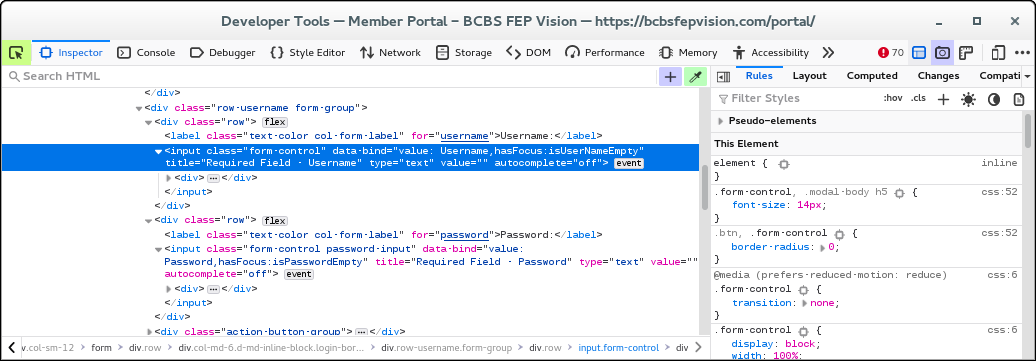
This doesn't look like a problem with that origin since the Inspector shows that the website uses an unusual configuration to code their login form. Firstly, the form is in an iframe (https://idoc.bcbsfepvision.com)
Secondly, both username and password fields are of type="text" and that makes it impossible for Firefox to detect this as a login form even if I use "This Frame -> Open Frame in New Tab". This configuration would require a special recipe to make this work with the Firefox Password Manager.