Αυτό το νήμα αρχειοθετήθηκε.
Κάντε νέα ερώτηση αν χρειάζεστε βοήθεια.

Αρχειοθετήθηκε
Bookmark bar change from white to black after 95.0 update

Hello Guys :)
The Firefox has updated and now, the bookmarks bar are black (previous as white).
Any option to turn the bookmarks bar to white again?
Any suggestion?, thank you.
See image: https://i.imgur.com/6BCCE0O.png

Hello Guys :)
The Firefox has updated and now, the bookmarks bar are black (previous as white).
Any option to turn the bookmarks bar to white again?
Any suggestion?, thank you.
See image: https://i.imgur.com/6BCCE0O.png
Όλες οι απαντήσεις (2)
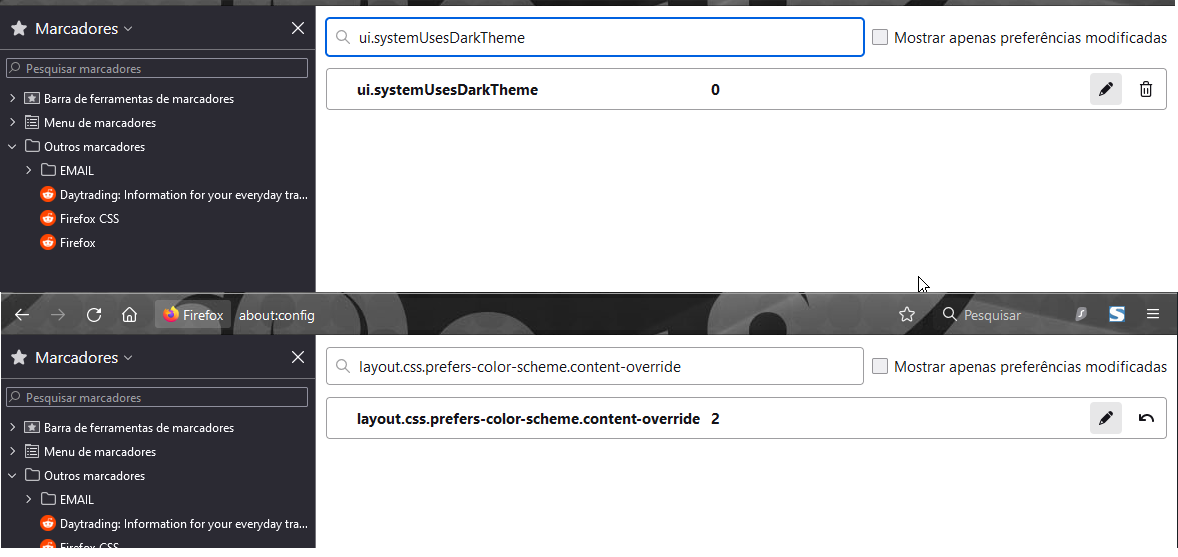
You can change this pref on the about:config page from 3 to 2 to revert to the Firefox 94 behavior.
- layout.css.prefers-color-scheme.content-override
Dark (0), light (1), system (2) or browser (3)
You can open the about:config page via the location/address bar. You can accept the warning and click "I accept the risk!" to continue.
See also this pref:
- ui.systemUsesDarkTheme [0:light; 1:dark; 2:no-preference]
Thanks for the suggestion, but unfortunately the bookmarks bar it's still dark :/