


How can I manually set the character encoding for a page?
I noticed that firefox lately hides more specific options from the character encoding settings.
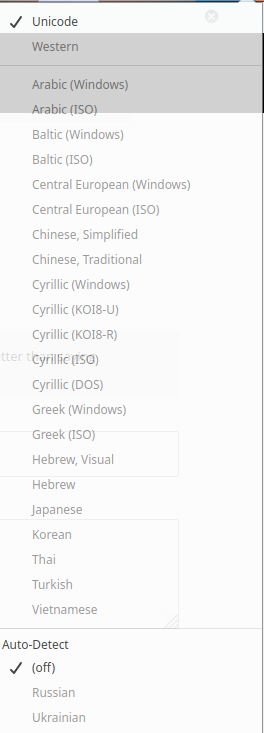
For example, it now has only one option for Japanese: "Japanese". It should contain encodings such as Shift-JIS, euc-JP, etc.. I want to, and I used to be able to, specify which of the encodings I need.
The auto detection really often messes it up, and this is a huge problem when browsing old-fashioned websites.
Is there any way I can specify the encoding manually? I'm OK with digging into about:config, or even use the developer tools if necessary (for an emergency measure).
Όλες οι απαντήσεις (3)
Firefox checks if changing the character encoding has any effect for the current site. If not, it's disables. For further information, can read this: https://superuser.com/questions/783864/why-does-firefox-disable-the-character-encoding-menu-for-some-sites/783976#783976
No, it's not about it disables the functionality. I'm not talking about the buttons being grey. Maybe my attachment was confusing.
For some site (e.g. https://www.kantei.go.jp/ ) we can choose "Japanese" as the encoding as of now. What I can't do is choosing between "Japanese (euc-jp)" and "Japanese (shift-JIS)" etc.
I think "Japanese" is a locale, or a *group of encodings*, rather than specific encoding I mentioned in the title.
Τροποποιήθηκε στις από τον/την lesguillemets
Websites should use Unicode these days and not an 8-bit legacy Encoding used in old days. For www.kantei.go.jp "Tools -> Page Info -> General" shows UTF-8 as send by the server, so there shouldn't be any need to change the Text Encoding (Unicode is selected and can't be changed).
You can only change the Text Encoding if the server doesn't send an encoding. There is a fallback encoding setting available in "Options/Preferences -> General -> Fonts"
Do you have a test page where the server doesn't send an encoding ?