Windows 10 reached EOS (end of support) on October 14, 2025. For more information, see this article.

Αναζήτηση στην υποστήριξη

Προσοχή στις απάτες! Δεν θα σας ζητήσουμε ποτέ να καλέσετε ή να στείλετε μήνυμα σε κάποιον αριθμό τηλεφώνου ή να μοιραστείτε προσωπικά δεδομένα. Αναφέρετε τυχόν ύποπτη δραστηριότητα μέσω της επιλογής «Αναφορά παραβίασης».

Μάθετε περισσότερα

Αυτό το νήμα αρχειοθετήθηκε. Κάντε νέα ερώτηση αν χρειάζεστε βοήθεια.

Google Calendar will not print, even in Private Window.

  • 3 απαντήσεις
  • 1 έχει αυτό το πρόβλημα
  • 36 προβολές
  • Τελευταία απάντηση από Rehlyt

περισσότερες επιλογές

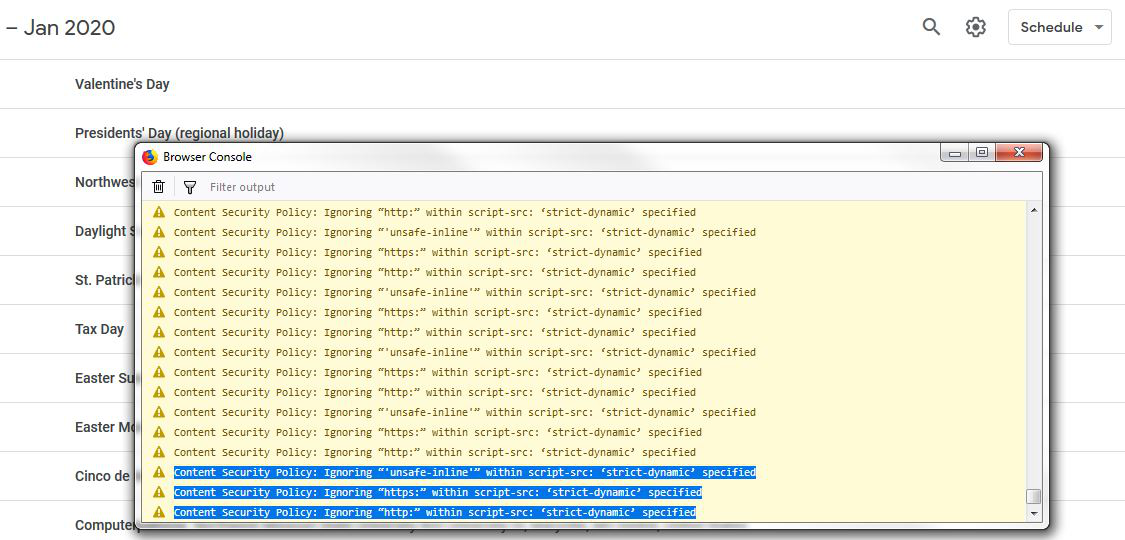
We can not get Google Calendar to print when we click the gear icon at the top and select print. The first dialogue box will pop up, but when we click print it does nothing. The log shows multiple lines of this:

Content Security Policy: Ignoring “'unsafe-inline'” within script-src: ‘strict-dynamic’ specified Content Security Policy: Ignoring “https:” within script-src: ‘strict-dynamic’ specified Content Security Policy: Ignoring “http:” within script-src: ‘strict-dynamic’ specified

How can we fix this? I have found no solution anywhere.

We can not get Google Calendar to print when we click the gear icon at the top and select print. The first dialogue box will pop up, but when we click print it does nothing. The log shows multiple lines of this: Content Security Policy: Ignoring “'unsafe-inline'” within script-src: ‘strict-dynamic’ specified Content Security Policy: Ignoring “https:” within script-src: ‘strict-dynamic’ specified Content Security Policy: Ignoring “http:” within script-src: ‘strict-dynamic’ specified How can we fix this? I have found no solution anywhere.

Όλες οι απαντήσεις (3)

περισσότερες επιλογές

Here is a screenshot.

περισσότερες επιλογές

What if you tried Chrome?

περισσότερες επιλογές

Yeah, it works fine in other browsers. That isn't the point. My back office prefers to use the Firefox browser, and I just find it surprising that Mozilla does not have a fix for this.