


New Private browsing windows are opening into pop-up windows

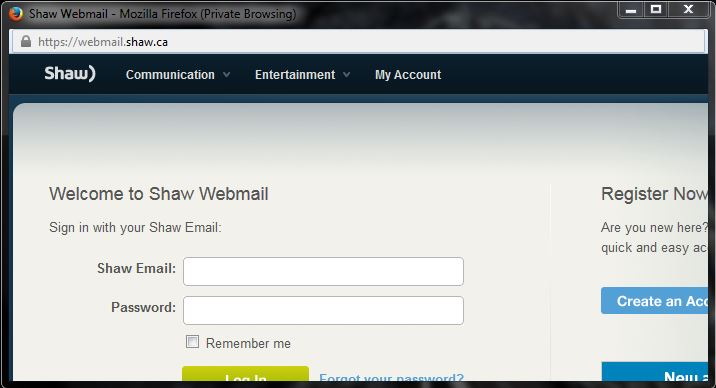
- Browsing in a Private Browsing window - Settings are set to... open link in a new window (which should be a new private browsing window) - I click the link on a site - New private window opens the link in a pop-up window ... with no scrollbar/menubar/bookmark bar/etc... I can maximize the window size, but have no way to see the lower part of the page.... [ see attached capture]
NOTE... it states at the top of that capture Private Browsing... The scrollbars/menubar/bookmark bar are gone., That capture is a pop-up....it is suppose to be a new private browsing window/web page.
- This is definitely a bug in the last upgrade. - using ver 38.0.1 - Browsing in a normal window works fine...that link opens in a new window fine, as is expected. , but something's broken when browsing in private windows. - Resetting mozilla did not fix the problem.
Τροποποιήθηκε στις από τον/την Metaflex
Επιλεγμένη λύση
This is a known bug in Firefox that is experienced by some, but not all, users. It can be worked around by following these steps:
- Navigate to about:config and click through the warning message.
- In the search box at the top of the page, type the text dom.disable_window_open_feature. Wait a few seconds for the filter to take effect or press Enter.
- Double click on any of the values listed that have a value of False to change them to True.
- Close the tab when you are done and the problem should be fixed!
Source: https://support.mozilla.org/en-US/questions/1062333?page=2#answer-732589
Προβολή απάντησης εντός συζήτησης 👍 2Όλες οι απαντήσεις (2)

Επιλεγμένη λύση
This is a known bug in Firefox that is experienced by some, but not all, users. It can be worked around by following these steps:
- Navigate to about:config and click through the warning message.
- In the search box at the top of the page, type the text dom.disable_window_open_feature. Wait a few seconds for the filter to take effect or press Enter.
- Double click on any of the values listed that have a value of False to change them to True.
- Close the tab when you are done and the problem should be fixed!
Source: https://support.mozilla.org/en-US/questions/1062333?page=2#answer-732589
Τροποποιήθηκε στις από τον/την tjohnson
Perfect fix tj !
Many Thx! ;)