


Windows 10 reached EOS (end of support) on October 14, 2025. If you are on Windows 10, see this article.

Search Support

Avoid support scams. We will never ask you to call or text a phone number or share personal information. Please report suspicious activity using the “Report Abuse” option.

Learn More
Open

Can't access websites or links

jbr replied
Sheila LV

I have written about this before, but the problems have multiplied. I've been keeping track of all the sites that I can't access in Firefox, and over the last month or so alone, there have been 23 instances of this. Not only not being able to access actual websites, but other connectivity issues. Several examples:

First, my local newspaper e-Edition comes up in a huge format that is unreadable and cannot be made smaller. It works fine on the Brave browser.

Different example: My daughter sent me several different links over a few days on Facebook Messenger to Amazon products that I wanted to buy. Her message is there, but the link/photo isn't. This renders completely normally on Brave.

Some other examples are restaurant menus listed on the restaurant's website, a Word Search puzzle from the L.A. Times, financial websites in which I have accounts. The list is seemingly endless. My last attempt to get support for this problem did not lead to any fix. This all occurs whether or not my adBlockers are turned off.

As a Firefox user since its inception, I don't like having to go to another browser, but the situation has been getting more and more untenable.
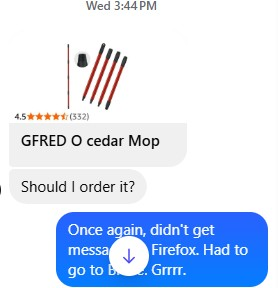
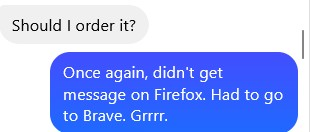
I have written about this before, but the problems have multiplied. I've been keeping track of all the sites that I can't access in Firefox, and over the last month or so alone, there have been 23 instances of this. Not only not being able to access actual websites, but other connectivity issues. Several examples: First, my local newspaper e-Edition comes up in a huge format that is unreadable and cannot be made smaller. It works fine on the Brave browser. Different example: My daughter sent me several different links over a few days on Facebook Messenger to Amazon products that I wanted to buy. Her message is there, but the link/photo isn't. This renders completely normally on Brave. Some other examples are restaurant menus listed on the restaurant's website, a Word Search puzzle from the L.A. Times, financial websites in which I have accounts. The list is seemingly endless. My last attempt to get support for this problem did not lead to any fix. This all occurs whether or not my adBlockers are turned off. As a Firefox user since its inception, I don't like having to go to another browser, but the situation has been getting more and more untenable.
Screen ƒe photowo kpe ɖe eŋu

All Replies (1)

How did the troubleshooting end up last time? https://support.mozilla.org/en-US/questions/1573253#answer-1808933 — any comparable results in that mode?

Bia biabia

You must log in to your account to reply to posts. Please start a new question, if you do not have an account yet.