


Can Thunderbird programmers add a profile import that will import a 20GB plus unzipped Profile folder?

Can Thunderbird programmers add a profile import that will import a 20GB plus unzipped Profile folder?
All Replies (9)

Hi Jay,
This is a peer-to-peer support forum for users, not a place to make a special request of developers. It's unlikely that developers would respond to such a request. There is another place to suggest features, but there's no need to have a Thunderbird function for importing a large profile. You can just move files through the file system.
Before proceeding, would you please say more about your current set-up and what you want to accomplish?
Help/Troubleshooting Info, about:profiles, Create a New Profile, Choose Folder..., browse to the unzipped Profile folder.
I have read thousands of words about how to do it and I’m still irritated because I can’t. My problems started when Thunderbird did an unwanted update and then wanted me to create a new profile. My wife was dying and I’m almost 90 years old.. I’ve tried using the add-on app, but it won’t handle 20 GB. It appeared to import a bit of my profile and then quit. Once an old profile is put into the right place in the Thunderbird folder, how do I get to it.? I read about the profile.INI file. Do I need to modify that? I did a new install after saving the old profile hoping that might work, but it left me still confused. I had trouble getting the SMPT settings, incoming and outgoing settings. Finally have that working. I tried to use the slowest changing version of Thunderbird. I donated money to Thunderbird, but I’ll never do it again because they started changing everything.
sfhowes said
Help/Troubleshooting Info, about:profiles, Create a New Profile, Choose Folder..., browse to the unzipped Profile folder.
sfhowes, the "choose folder" function sets where the new profile will be created. How does browsing to the unzipped profile folder there help? Isn't it better to keep all the profiles in the profiles folder? How should Jay import a profile? Does he have to import at all? His old profile is probably still in his profiles folder, just not in use because of possible incompatibility with an upgrade.
The source profile can be anywhere. Place it in the standard location if desired. 'Creating' the profile this way avoids editing the profiles.ini file and guarantees it will be read by TB. If the old profile is still readable by TB, it can be launched from about:profiles. As long as it wasn't created by a newer version of TB than the one installed, it should be readable by the current TB.
sfhowes said
The source profile can be anywhere. Place it in the standard location if desired. 'Creating' the profile this way avoids editing the profiles.ini file and guarantees it will be read by TB. If the old profile is still readable by TB, it can be launched from about:profiles. As long as it wasn't created by a newer version of TB than the one installed, it should be readable by the current TB.
Thanks. I'm still not seeing the connection between creating a new profile and using the old profile, so I'm guessing that Jay may not see it either. And I'd like to know exactly how to guide him. What I have so far is this:
- Move the old profile into the profiles directory.
- Create a new profile in the profiles directory.
OK, now there are two profiles in the profiles directory that didn't used to be there. What's next? Isn't there a step for importing the old profile into the newly created profile or something similar?
Then set the preferred profile as the default.
If the old profile is still readable by TB, it can be launched from about:profiles. As long as it wasn't created by a newer version of TB than the one installed, it should be readable by the current TB.
So can Jay just go to about:profiles and set his old profile as the default? If there are no compatitbility issues, why did Thunderbird create a new profile? Or are you talking about the old profile after some kind of process to import it into the newly created profile?
Just to jump in briefly.... if the old profile is 'known' to thunderbird, it will appear after clicking 'about:profiles', but if it was manually placed there, it will not appear. On your question, Rick, my experience matches Sfhowes' comment: an old profile can be launched. The question that has always puzzled me is what you mentioned - why does Thunderbird sometimes create a new profile? I have never found that answer. WHen users post that an upgrade lost their account or addressbook, I always suggest exploring the old profile.
To @JayinOk: there is an existing tools>import>Import from another thunderbird installation>import from a profile folder. Have you tried that? It matches your question. Also, if your 20 GB is IMAP, it is possible to reduce the profile to a tiny size for transferring from one PC to another. If that approach is desired, let us know.
Thanks, David.
I am eager to understand some things here that I am not understanding.
Jay, as far as I can tell, the first thing that you should do is look for old profile where it has always been and see if you can set it to be the default profile again. If you can, you will not have to deal with importing.
- Help menu in the menu bar or through the ≡ button at top right
- Troubleshooting information
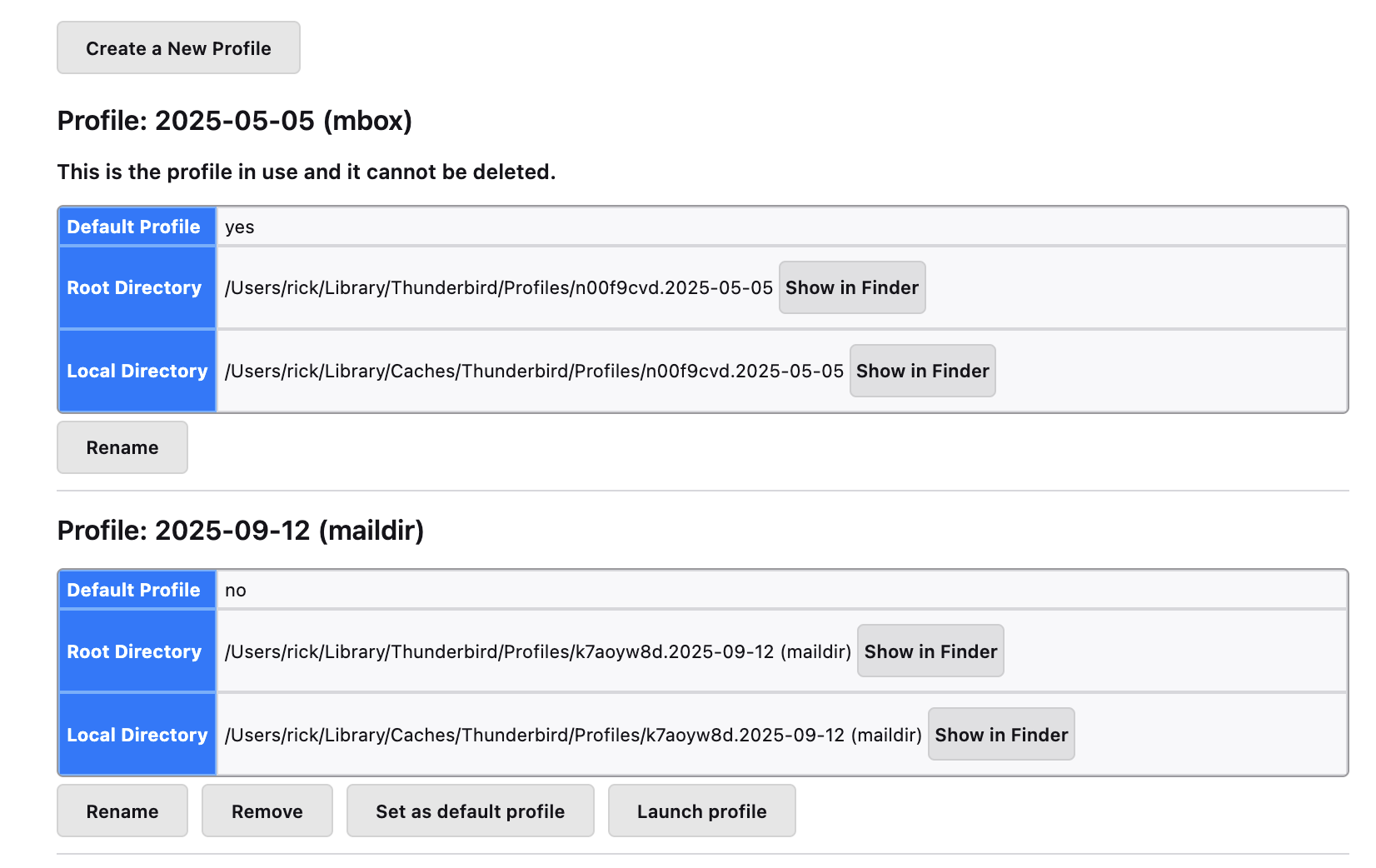
- Look down in the second column of the first table for "about:profiles" and click on it. You should see a page that looks like my attached image.
- Do you see more than one profile? Can you tell if one of them is the older profile that you want to use, the one that you used before Thunderbird did an update and created a new profile? If you do, set it as your default profile and re-start Thunderbird.
sfhowes and David, if you think that this is not the right approach, would you please say so?
Rick, if Jay has NOT made any changes since the update, then I believe your statements are correct. In several other threads, I have made this suggestion and was successful. But in reading Jay's posts, it appears that he has made some changes And, I defer to sfhowes in this, as I routinely have sought his guidance.