


Can't send or receive emails in Thunderbird.

I have the same original problem as https://support.mozilla.org/en-US/questions/1508740 , and from the same time period, but across 4 of 5 email addresses, with additional problems. All given answers then & now on this website have completely failed me.
I have 4 emails on the same server, which use IMAP, so there is no way for me to adjust any msg retrieval settings, because they don't exist. Surprisingly, one of these 4 emails actually does work in sending & receiving, but I got different error with it, just now! I also have one gmail affected by this original 2 year old problem, as well.
Closing program, restarting computer, and downloading TB updates all do not work. I uninstalled/reinstalled TB, and all of my profiles & emails were surprisingly intact with no deletes (yes, I backed them up in another folder first), and the problem persists upon reinstall of TB, on the exact same emails as the original problem. Antivirus & firewalls are off. Server said it wasn't them. I'm using Windows 11, McAfee antivirus, and the newest TB dld is Eclipse.
There is no distinct alphanumeric error message for the oldest problem, just the usual "Login to server with username failed. Retry/Enter New Password/Cancel." All passwords are correct. None of my passwords are "saved" in the TB program, and I'm having trouble locating where to tell it to do otherwise.
Screencap and copy/paste attempts to grab second error message failed, but it looked like "RETR failed, one message expunged." So far, it's a one-time error, which I can live with. All emails for that ONE working email are fine.
When I attempt to sign into Google, it takes me to a troubleshooting page https://support.google.com/accounts/answer/32050?hl=en asking me to clear cache & cookies, if I'm using Chrome (which I'm not), instead of just a login to retrieve my gmail.
My emails have been sitting on the servers for 2 YEARS and I am at my wits' end - please help!!!
All Replies (2)
rainbowheron said
I have 4 emails on the same server, which use IMAP, so there is no way for me to adjust any msg retrieval settings, because they don't exist. Surprisingly,
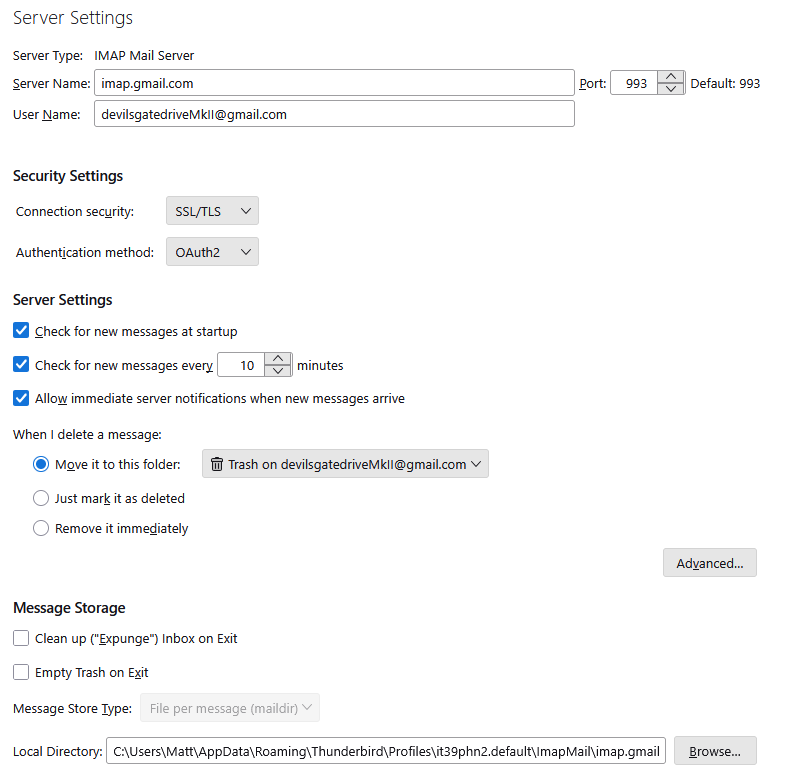
Here are just those settings you say do not exist for one of my IMAP Gmail accounts in the current ESR release. (I also have the same information in the developer daily build so it has not gone away in the latest releases)
one of these 4 emails actually does work in sending & receiving, but I got different error with it, just now! I also have one gmail affected by this original 2 year old problem, as well.
I am just another Thunderbird user. so unless you can share the actual error message the best I can do is guess.
Closing program, restarting computer, and downloading TB updates all do not work. I uninstalled/reinstalled TB, and all of my profiles & emails were surprisingly intact with no deletes (yes, I backed them up in another folder first), and the problem persists upon reinstall of TB, on the exact same emails as the original problem. Antivirus & firewalls are off. Server said it wasn't them. I'm using Windows 11, McAfee antivirus, and the newest TB dld is Eclipse. >/blockquote> Uninstall McAfee and see if things get better. There is a host of manual things you have to do to make McAfee work with Thunderbird. Back in 2012 they released a new heuristics engine (Just a short time after Intel bought the company from it's founder John McAfee. In my opinion that was the beginning of the end for McAfee. They have been crashing Thunderbird, blocking mail and generally not doing a good job of allowing folk to use their mail client ever since. There is no distinct alphanumeric error message for the oldest problem, just the usual "Login to server with username failed. Retry/Enter New Password/Cancel." All passwords are correct. None of my passwords are "saved" in the TB program, and I'm having trouble locating where to tell it to do otherwise. Screencap and copy/paste attempts to grab second error message failed, but it looked like "RETR failed, one message expunged." So far, it's a one-time error, which I can live with. All emails for that ONE working email are fine. When I attempt to sign into Google, it takes me to a troubleshooting page https://support.google.com/accounts/answer/32050?hl=en asking me to clear cache & cookies, if I'm using Chrome (which I'm not), instead of just a login to retrieve my gmail.
That like is very clear in stating Clear cache & cookies
When you use a browser, like Chrome, it saves some information from websites in its cache and cookies. Clearing them fixes certain problems, like loading or formatting issues on sites.
Funny thing, ALL browsers (including Thunderbird) have a cache. Google offered advice on how to clear the cache in the browser they make. You are not "just a login to retrieve my gmail" Gmail uses the oauth authentication method, this method requires a browser to set up and provide the initial authentication as well as cookies. oAuth is at it's heart a browser specific authentication method which Thunderbird was able to meet by leveraging the inherited parts of the Firefox browser from the Mozilla platform on which it is built.
See https://support.mozilla.org/en-US/kb/how-clear-firefox-cache for clearing the cache in Firefox.
In Thunderbird go to the appmenu, select help and then the troubleshooting information. Then press the clear startup cache button on the top right of the tab.
My emails have been sitting on the servers for 2 YEARS and I am at my wits' end - please help!!!
You say 2 years. I mentioned the oauth authentication requirements for gmail. That commenced to be a requirement from May 30, 2022 so I would assume your authentication method is oAuth, as there was an automatic conversion. See https://support.mozilla.org/en-US/kb/automatic-conversion-google-mail-accounts-oauth20 However as you apparently have not found the fetch timing on the same pane as the authentication method I think we should check that this is not the issue all along. Is it set to OAuth2 as shown in the image I posted?
Thank you for your attempts to help. These are the status updates since my original posting. I have deliberately made no attempt to even open my TB since my OP, to give the various software and the server time to update (plus busy life).
1. My server has made some changes on their end (no idea what) and it's produced the following 3 results:
1A. Without changing a thing on my end, since I posted, the last downloaded emails, as of today, are as follows: account 1 (main): 3/19/24 account 2 (inactive): 1/1/24 account 3 (gmail): today *all I was prompted to do was login, which isn't what happened back in September account 4 (family member): 2/19/24 account 5 (alt): 1/13/26 *this is the only one that has been properly working all along, and it's on the same server as accounts 1, 2, & 4
(My "2 years" is a necessary estimate, as my time is completely monopolized elsewhere, and 1.5 years rounds up to 2.)
1B. TB Server Settings now says the 4 from the same server are POP instead of IMAP, which is incredibly bizarre because they *are* a POP, but for some odd reason the app distinctly said they were "IMAP" at the time I posted. Yes, I double-checked the settings before posting, I even had the 2 windows side-by-side to avoid error. Difference of current display is not changing the fact that email still won't download for 3 of those accounts.
(It's the "MSG Retrieval Settings" that don't exist, not the "Server Settings." "MSG Retrieval Settings" were specifically mentioned in the referenced support question's Chosen Solution, and I still can't find what he's talking about. If "MSG Retrieval Settings" are the same as "Server Settings," then clarification/verification would be helpful, as it's confusing to read "MSG Retrieval Settings," when trying to troubleshoot.)
1C. Authentication method for accounts 1, 2, 4, and 5 are set to Normal Password, same as always.
2. Gmail gave me a brand new screen today, which finally allowed me to login, so my gmail is now up to date. It does use the oAuth2 you mentioned. But that is now not the problem.
(I am *not using Chrome,* I said so in my OP. So, unless Firefox and Thunderbird are Chrome...)
3. Fully aware all browsers have a cache. Clearing the cache for Firefox (my default) when Thunderbird is mucking up doesn't make sense. Tried it anyway, also cleared cache for computer, and TB, and it all did absolutely nothing, as I tried them after the gmail finally downloaded, today. 3 accounts still not downloading, after multiple attempts, post-cache clearing.
4. Error screencap won't help because it's the same one I quoted before. Self-censoring with brackets for privacy, the errors all say: account 1 (main): "Login to account [name] failed. Login to server mail.[name].net with username [name] failed. Retry / Enter New Password / Cancel" account 2 (inactive): "Login to account [name] failed. Login to server mail.[name].net with username [name] failed. Retry / Enter New Password / Cancel" account 4 (family member): "Login to account [name] failed. Login to server mail.[name].net with username [name] failed. Retry / Enter New Password / Cancel"
That's it. I'm simply not given any additional error info, by TB.
(That other odd error box I got the night of my OP has not yet popped up again, and I was unable to screencap it that night.)
6. Attempts to send email, tdoay, produced the following results: test sent from account 1 (main): sent to account 4, shows up received on server, won't download to TB test sent from account 2 (inactive): sent to account 4, shows up received on server, won't download to TB test sent from account 4 (family member): send to account 1, shows up received on server, won't download to TB test sent from account 5 (alt): sent to account 4, shows up received on server, won't download to TB
At least I can send, now, which is an improvement, but I'm still not downloading. And I have no idea what has caused these changes, because nothing I did actually helped, except to wait a few months.
Any ideas?