


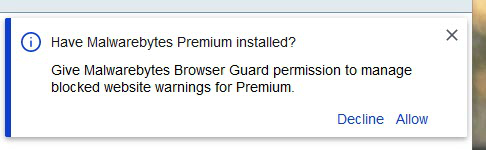
I keep getting the same permission request for Malwarebytes Browser guard

I keep getting the attached permission request every time I restart Firefox. I have clicked on "allow" multiple times and checked everything I could in Firefox and add-on settings and see nothing that would prevent Firefox from remembering my permission. I have used this add-on for quite a long time without this problem. Is it related to a recent Firefox update?
Thanks very much for any suggestions you can come up with.
Ŋuɖoɖo si wotia
The problem had a simple solution. I had added the browser guard add-on from the installation dialog for MalwareBytes. I simply deleted the add-on from the security page in Firefox settings, closed and re-opened Firefox and reinstalled the add-on from the Firefox search page. The permission dialog was required at this point, of course, but has not recurred again.
Xle ŋuɖoɖo sia le goya me 👍 0All Replies (3)

https://support.mozilla.org/en-US/kb/how-to-fix-preferences-wont-save
Note: Some software, like Advanced SystemCare with Surfing Protection, can protect files in the Firefox profile folder against changes. If you have such software then check the settings or uninstall this software.
Macs: Make sure you install Firefox properly and that you do not run
Firefox from within the DMG (Disk Images) file.
https://support.mozilla.org/en-US/kb/how-download-and-install-firefox-mac
Ɖɔɖɔɖo si wotia
The problem had a simple solution. I had added the browser guard add-on from the installation dialog for MalwareBytes. I simply deleted the add-on from the security page in Firefox settings, closed and re-opened Firefox and reinstalled the add-on from the Firefox search page. The permission dialog was required at this point, of course, but has not recurred again.
That was very good work. Well Done.