Toś ta nitka jo se archiwěrowała.
Pšosym stajśo nowe pšašanje, joli trjebaśo pomoc.

Rozwězany
Archiwěrowany
Please tell me how to have a new tab open with my home page and how to get a home button on the menu bar

I do not have a home button on any menu bar? And cant find one to add.. And How can I have a new tab open to my home page, (Fire Fox)
I do not have a home button on any menu bar? And cant find one to add.. And How can I have a new tab open to my home page, (Fire Fox)
Wšykne wótegrona (2)
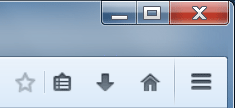
It's on the right-side of the Navigation Bar. You can use the Customize feature and drag the Home button up to the Menu Bar, to the right of Help.
Wubrane rozwězanje
The Home button is normally in the top right corner, to the left of the ≡ Menu Button (see attached screenshot). If it's missing, right-click an empty area of the tab bar and choose Customize. Drag it from the palette onto a toolbar.
To change what page opens in each new tab,
- Type about:config into the address bar and press Enter.
- To bypass the warning, press the big button labeled "I'll be careful, I promise!".
- In the search box, paste browser.newtab.url
- In the search results, double-click browser.newtab.url and set its value to any web page URL you want, or an internal page like about:home