


Firefox isn't displaying webpage correctly

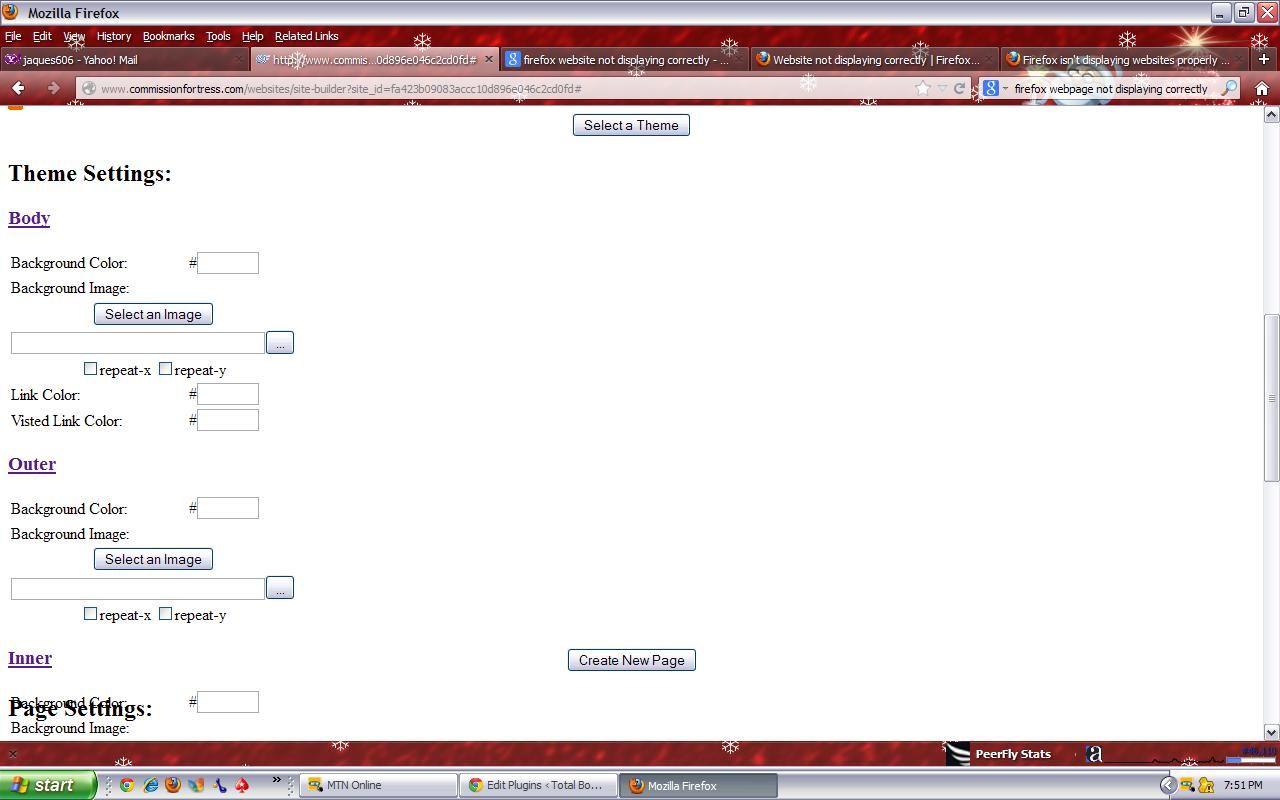
The website was working previously but now the page does not load correctly, and when you scroll down the page it only shows Theme Settings: Body Background Color: # Background Image: repeat-x repeat-y Link Color: # Visted Link Color: # Outer Background Color: # Background Image: repeat-x repeat-y
Nothing else shows
Wšykne wótegrona (2)
Here's the image of the page...
Reload web page(s) and bypass the cache to refresh possibly outdated or corrupted files.
- Press and hold Shift and left-click the Reload button.
- Press "Ctrl + F5" or press "Ctrl + Shift + R" (Windows,Linux)
- Press "Command + Shift + R" (MAC)
Clear the cache and the cookies from sites that cause problems.
"Clear the Cache":
- Tools > Options > Advanced > Network > Cached Web Content: "Clear Now"
"Remove Cookies" from sites causing problems:
- Tools > Options > Privacy > Cookies: "Show Cookies"
Start Firefox in Safe Mode to check if one of the extensions (Firefox/Tools > Add-ons > Extensions) or if hardware acceleration is causing the problem (switch to the DEFAULT theme: Firefox/Tools > Add-ons > Appearance).
- Do NOT click the Reset button on the Safe mode start window or otherwise make changes.