


How to create a simple backup of the entire Thunderbird folder?
I'm asking this question so I can post some helpful information for people wanting to create a backup of their profile.
If you are using Windows OS and you got your download from the official website: https://www.thunderbird.net/en-US/thunderbird/all/
How do you locate the correct folder to backup? The backup must contain everything, profiles, mail accounts, emails, address books, calendar, preferences - the lot. The backup can be used to transfer between computers.
Wšykne wótegrona (3)
Wubrane rozwězanje
Exit Thunderbird - this is important.
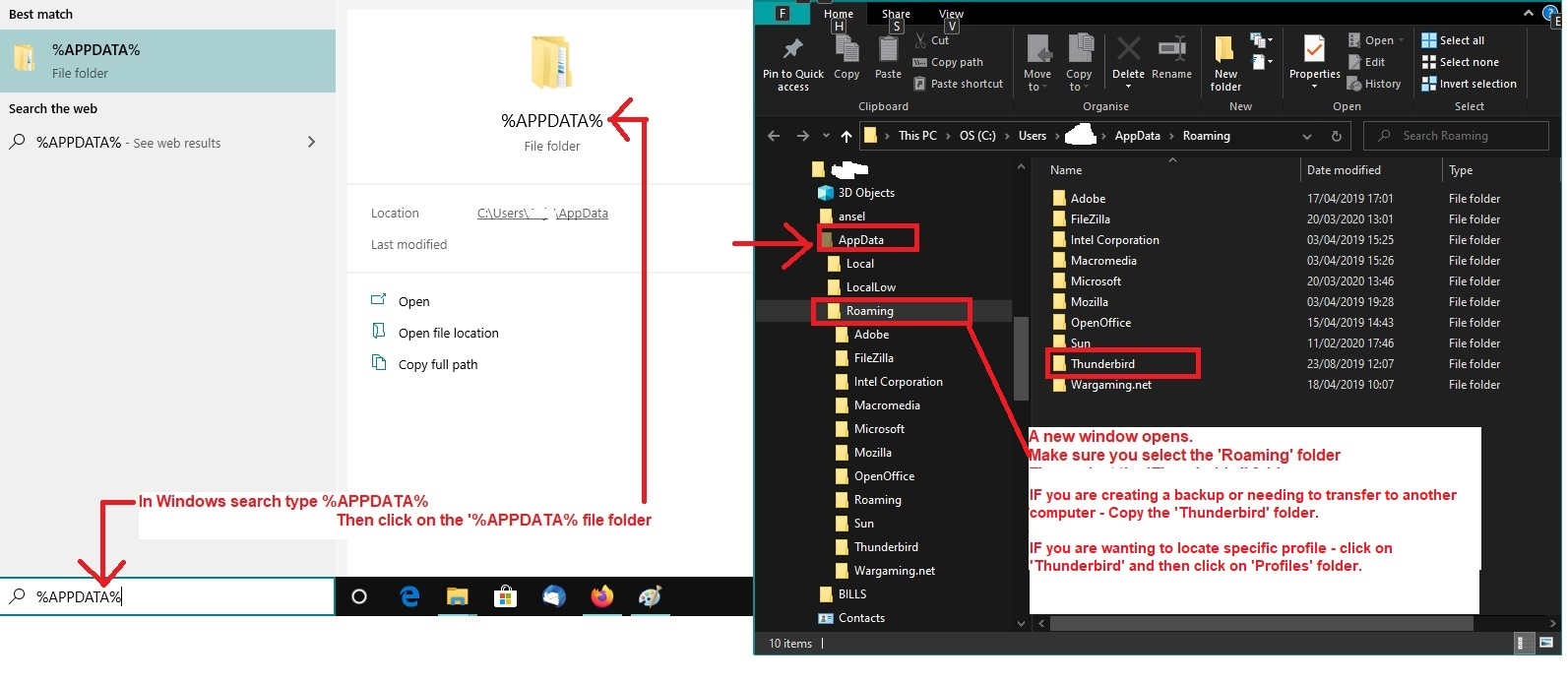
- In windows search type: %Appdata% - see image below as a guide
- Select the %Appdata% File folder
- Select the 'Roaming' folder
- Copy the 'Thunderbird' folder
Paste the 'Thunderbird' folder in a suitable location to act as backup eg: another drive, an external drive, a USB, but make sure there is enough space.
But what happens if you got the Thunderbird program download from the 'Windows App Store'?
Just to confuse the issue, Microsoft decided to use it's own location for the profile, which is very confusing for many people because it means all the information you may locate on Thunderbird and Profiles does not seem to apply.
If you downloaded the Thunderbird app from the 'Windows app Store' then your profile will be in this location: \Users\username\AppData\Local\packages\MozillaThunderbird.MZLA_h5892qc0xkpca\LocalCache\Roaming\Thunderbird\
So do this: Exit Thunderbird - this is important.
- In windows search type: %Appdata%
- Select the %Appdata% File folder
There is a difference to the path, so do this...
- select 'Local' folder
- select 'packages' folder
- select 'MozillaThunderbird.MZLA_h5892qc0xkpca' folder
- Select 'LocalCache' folder
- finally you can now select the 'Roaming' folder to see the 'Thunderbird' folder.
- Copy the 'Thunderbird' folder
Paste the 'Thunderbird' folder in a suitable location to act as backup eg: another drive, an external drive, a USB, but make sure there is enough space.
Wót Toad-Hall změnjony
Thanks Toad-Hall for sharing your knowledge with an ignorant. Now, do you get a notification from the forum robot?