


Dynamic-XFA Java Element Buttons Don't Work in Firefox Desktop 151
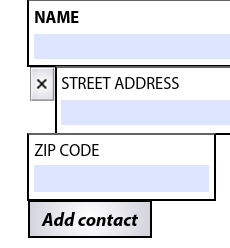
Trying to not just edit a PDF in Firefox on Linux but actually edit the document using its Dynamic-XFA format elements of that PDF. XFA is an Adobe proprietary format that they depreciated several years ago but it still works in Adobe Acrobat Free. (I use a Windows guest VM for this as a workaround for now but I'd rather not since it takes extra resources and time). Elements can be filled in FF and some menu drop downs work in FF but other dynamic XFA element buttons don't respond like the one I attached.
In Acrobat the "X" and "Add Contact" buttons will add or remove some elements to the document.
Can this be done in FF desktop?
Version 151.0.1 (64 bit) on desktop PC.
In about:config I know there are a lot of options to modify under the search term "pdfjs" but I don't know what element would allow this to possibly work if its supported.
I wish I had other better options but government documents are what they are.
Wubrane rozwězanje
You need to use the link I gave you -> https://github.com/mozilla/pdf.js/issues/new/choose
Toś to wótegrono w konteksće cytaś 👍 1Wšykne wótegrona (4)
I looked on the main firefox page for actions and it doesn't allow me to add an issue. I'm not sure were on their github page I would report this.
https://github.com/mozilla-firefox/firefox/actions << Doesn't allow reporting
https://github.com/mozilla-firefox/firefox/ << Doesn't allow reporting
Wubrane rozwězanje
You need to use the link I gave you -> https://github.com/mozilla/pdf.js/issues/new/choose